
Medical Practice Workflow Automation: Streamline Operations Without Losing the Human Touch
The average medical practice operates with dozens of manual workflows that consume staff time, introduce errors, and create bottlenecks. From the moment a patient calls to schedule through billing and follow-up, there are 15-20 distinct process steps — many of which can be automated without any loss of quality or personal touch.
Workflow automation doesn't mean replacing people. It means freeing your team from repetitive, rule-based tasks so they can focus on the high-value work that actually requires human judgment, empathy, and clinical expertise.
Mapping Your Practice Workflows
Before automating, map your current processes. Most medical practices have five core workflow categories:
1. Patient Access (Pre-Visit)
Scheduling, insurance verification, pre-registration, and appointment reminders. This workflow category accounts for 30-40% of front desk staff time and is the most automatable. Key automation targets: AI-powered scheduling that handles phone and online booking, automated eligibility verification 48 hours before each visit, digital intake forms sent via text with automated reminders, and multi-channel appointment reminders.
2. Clinical Workflows
Rooming, documentation, orders, referrals, and prescriptions. While clinical decision-making can't be automated, the administrative tasks surrounding it can: auto-population of visit templates based on appointment type, standing order sets for routine visits (annual physicals, well-child checks), automated referral tracking and follow-up, and prescription refill request capture and routing.
3. Patient Communication
Appointment reminders, results notification, care instructions, and follow-up. An AI-powered communication system handles: inbound call answering and routing, outbound reminders and notifications, post-visit follow-up sequences, and patient satisfaction surveys.
4. Revenue Cycle
Charge capture, claims submission, payment posting, and patient billing. Automation targets: automated charge capture from EHR encounter data, claims scrubbing and electronic submission, payment posting from ERA files, and patient payment automation with text-to-pay and payment plans.
5. Administrative Operations
Staff scheduling, supply ordering, compliance tracking, and reporting. Often overlooked but highly automatable: staff schedule generation based on patient volume patterns, supply reorder triggers based on usage data, compliance training reminders and tracking, and automated daily/weekly/monthly operational reports.
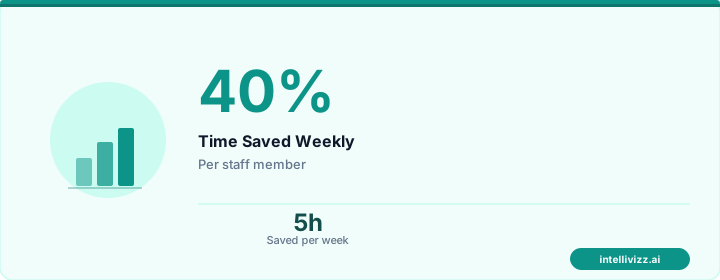
🏥 Patients expect instant responses — automation delivers
From manual processes to automated excellence
The Automation Priority Matrix
Prioritize automation by impact and complexity:
High impact, low complexity (start here): appointment reminders, digital intake forms, automated payment reminders, post-visit satisfaction surveys.
High impact, moderate complexity: AI phone answering, insurance eligibility verification, waitlist backfilling, referral tracking.
High impact, higher complexity: full scheduling automation, revenue cycle automation, clinical workflow optimization.
Lower impact (defer): supply chain automation, facility management, HR workflows.
Implementation Approach
The most successful implementations follow a phased approach:
Phase 1 (Weeks 1-4): Implement appointment reminders and digital intake. These are quick wins with immediate measurable impact (reduced no-shows, faster check-in).
Phase 2 (Weeks 5-8): Add AI phone handling and payment automation. These address the two biggest operational pain points (missed calls, slow collections).
Phase 3 (Weeks 9-16): Layer in scheduling optimization, referral tracking, and patient follow-up sequences. These require more configuration but deliver compounding benefits.
Phase 4 (Ongoing): Revenue cycle automation and advanced analytics. These represent the deepest integration but also the largest financial impact.
Expected Results
Practices that systematically automate their workflows typically see within 6 months: 30-50% reduction in no-shows, 20-35% improvement in patient collections, 15-25% reduction in front desk FTE needed per provider, 40-60% decrease in phone hold times, improved staff satisfaction (less repetitive work), and better patient experience scores.
The key is to start with the highest-impact, lowest-complexity automations and build momentum. Each successful automation frees up resources and builds confidence for the next phase.
Ready to map and automate your practice workflows? Book a free consultation for a workflow assessment tailored to your practice size and specialty.
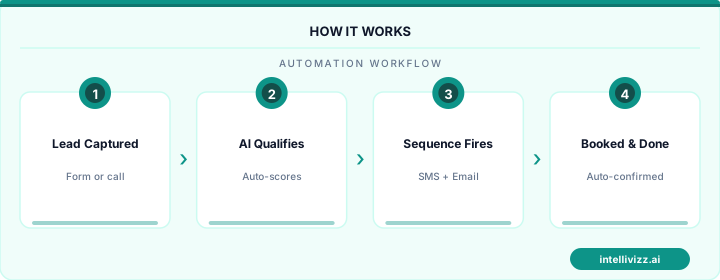
🏥 Patients expect instant responses — automation delivers
See how automation transforms industry operations
Mapping the Medical Practice Workflow: Where Automation Delivers the Highest Value
Medical practice workflows can be divided into four domains: patient acquisition (marketing, inquiry handling, new patient onboarding), patient engagement (scheduling, reminders, pre-visit preparation), clinical support (documentation, lab follow-up, referral coordination), and revenue cycle (insurance verification, claims submission, payment collection). Automation delivers value across all four domains, but the ROI is not evenly distributed. Revenue cycle automation and patient engagement automation consistently deliver the highest measurable returns, while clinical support automation delivers the highest impact on physician satisfaction and quality of care.
The most common automation implementation sequence for practices new to workflow automation is: start with appointment reminders (highest immediate ROI, lowest implementation complexity), then add after-hours phone coverage (immediate new patient capture impact), then insurance eligibility verification (significant collections cycle improvement), then patient recall campaigns (preventive care and chronic disease management revenue), then clinical documentation support (physician time savings and burnout reduction). This sequence allows practices to build automation competency incrementally while generating positive ROI at each stage to fund the next implementation.
Practices that attempt to automate everything simultaneously typically struggle with change management — staff resistance, configuration errors, and integration failures are amplified when multiple systems are deployed at once. The phased approach reduces change management complexity and allows staff to develop comfort with each automation layer before the next is added. This is especially important in medical practices where workflow disruptions directly affect patient care quality and staff wellbeing.
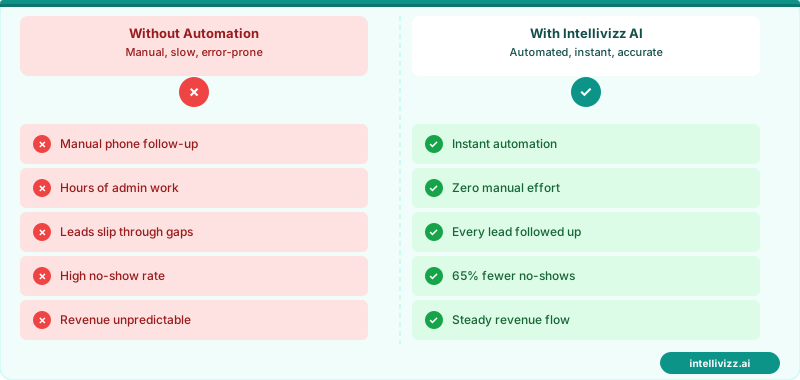
🏥 Phase your automation rollout — each layer funds the next
Practices using a phased automation approach achieve full implementation 40% faster than those who go all-in simultaneously.
Referral Coordination Automation
Referral coordination is among the most complex and labor-intensive workflows in medical practice management — and among the most consequential for patient outcomes. When a primary care physician refers a patient to a specialist, the care continuum depends on: the referral being transmitted to the specialist correctly, the patient understanding the referral and taking action to schedule, the patient actually keeping the specialist appointment, and the specialist's notes returning to the PCP in a timely fashion. Each of these handoffs is a potential failure point, and in practices without automation, a significant percentage of referrals are never completed.
Studies across healthcare settings show that 20-40% of physician referrals are never followed through by patients — a gap with significant clinical consequences for chronic disease patients and those with newly diagnosed conditions. Automated referral coordination addresses this by sending patients a referral notification with the specialist's contact information and scheduling link immediately after the referral order is placed, following up 48-72 hours later if no appointment has been scheduled, and reminding the patient 24 hours before their specialist appointment. On the clinical side, automated fax or direct-message systems send referral notes to specialists and follow up on return notes — closing the loop without requiring manual tracking by PCP staff.
| Workflow Domain | Key Automation | Staff Hours Saved/Month | Revenue Impact |
|---|---|---|---|
| Patient acquisition | AI phone + online scheduling | 20–30 hrs | +$8,000–$20,000 |
| Patient engagement | Reminders + recall campaigns | 25–40 hrs | +$12,000–$30,000 |
| Clinical support | Referral coordination + lab follow-up | 15–25 hrs | Quality metric improvement |
| Revenue cycle | Insurance verification + claims | 30–50 hrs | +$15,000–$40,000 |
Chronic Disease Management Automation
Chronic disease management represents one of the largest automation opportunities in primary care, driven by the size of the chronic disease patient population (approximately 60% of US adults have at least one chronic condition) and the clear protocols that define appropriate care intervals. Diabetic patients require HbA1c testing every 3 months, annual eye exams, annual foot exams, and quarterly blood pressure monitoring. Hypertensive patients require blood pressure follow-ups every 1-6 months depending on control status. Patients with chronic kidney disease require regular labs and nephrology referral at specific GFR thresholds. For a deeper dive into digitizing your front desk, see our guide on automated patient intake forms.
Manual tracking of these care intervals across hundreds or thousands of patients is error-prone and time-consuming. AI automation systems that connect to the EHR can identify patients who are overdue for chronic disease monitoring, generate personalized outreach (reminding the patient specifically about their HbA1c or blood pressure check, not just a generic "time for a visit" message), and track whether the outreach resulted in a scheduled appointment. Practices that implement chronic disease recall automation report 25-40% improvements in preventive care quality metrics — which translates directly into higher value-based care reimbursements from CMS and commercial payers in practices participating in ACOs, PCMH programs, or Medicare Advantage plans. See the patient referral program automation guide to understand how chronic disease management patients, who have longer relationships with their providers, can also become powerful referral sources.
Selecting and Implementing Workflow Automation Vendors
The medical practice automation vendor landscape includes dozens of point solutions (each addressing a specific workflow) and several comprehensive platform players (offering multiple automation functions from a single vendor). Practices evaluating vendors should consider the full integration picture — how well each candidate integrates with the practice's existing EHR, billing system, and patient communication tools — before comparing features in isolation. A technically superior reminder platform that integrates poorly with the practice's EHR will deliver worse outcomes than a simpler platform with deep native EHR integration.
Budget allocation for automation should reflect the phased implementation sequence: fund the first phase (phone and scheduling automation) from the operational budget, then use demonstrable ROI from Phase 1 to justify Phase 2 investment to physicians or practice ownership. This approach de-risks the investment and creates an internal success story that builds organizational confidence for broader automation adoption. Practices that try to secure budget for all phases simultaneously before demonstrating results typically face longer approval cycles and more internal skepticism than those who prove value incrementally.
Vendor contract terms deserve careful attention. Most automation platforms offer monthly and annual contracts, with annual contracts providing 15–25% cost savings. For practices uncertain about adoption, monthly contracts provide flexibility at a higher price. Implementation and onboarding fees (which can range from $0 for self-serve platforms to $5,000+ for enterprise solutions) should be factored into total cost of ownership calculations. Data portability — the ability to export your patient communication history and workflow data if you switch vendors — is an often-overlooked contract term that becomes significant if you need to change platforms after a year or more of accumulated data.
Ready to modernize your practice? Explore our healthcare automation solutions, Medical Practice Revenue Leakage: 7 Hidden Drains and..., or AI Automation for Medical Practice: A Practical....
Relevant AI Automations
AI Review Management (HIPAA-Compliant)
All-in-one HIPAA-compliant review management: automated review requests, AI-powered responses, and review repurposing for web & social.
HIPAA-Compliant AI Voice Agent — 24/7 Patient Call Handling
HIPAA-compliant AI voice agent answers every patient call 24/7 — triages urgency, books appointments, and sends encrypted follow-ups
Website Live Chat → Patient Booking Funnel
AI-powered live chat on the practice website engages visitors, answers questions about services/insurance, collects cont