
Patient Appointment Reminder Automation: The Complete Setup Guide for Medical Practices
Automated appointment reminders are the single highest-ROI automation any medical practice can implement. Meta-analyses consistently show a 29-39% reduction in no-shows from well-designed reminder systems — translating to tens of thousands of dollars in recovered revenue per month for a busy practice. Yet many practices are still relying on manual reminder calls or basic single-channel notifications that leave significant improvement on the table.
This guide walks you through setting up an optimized, multi-channel reminder system from scratch — or upgrading your existing setup to maximize effectiveness.
Channel Selection: Text vs. Email vs. Phone
Each reminder channel has different strengths:
- SMS/Text: 98% open rate, 90% read within 3 minutes. Best for urgent reminders (48-hour and morning-of). The backbone of any modern reminder system.
- Email: 20-30% open rate, but allows for richer content (prep instructions, forms, maps). Best for the initial confirmation and 7-day reminder.
- Phone call (AI-powered): 15-25% answer rate, but creates a personal connection. Best for high-risk patients or appointments requiring complex preparation. An AI receptionist can make these calls at scale.
The optimal approach uses all three channels in a coordinated sequence rather than relying on any single channel.
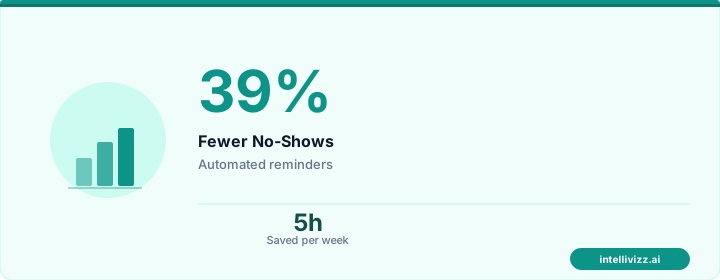
🏥 Patients expect instant responses — automation delivers
The data speaks for itself
Optimal Timing Sequence
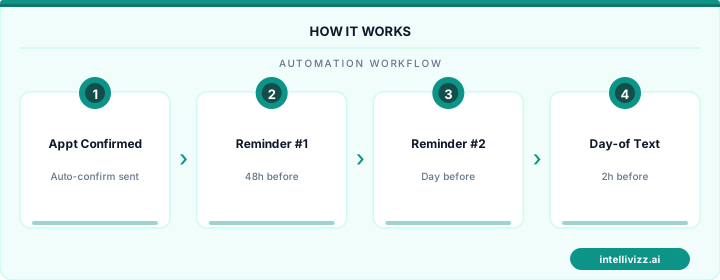
Based on research across thousands of medical practices, the most effective reminder timing is:
- Booking confirmation (immediate): Email + SMS. Includes appointment details, calendar invite link, and what to expect.
- 7-day reminder (for appointments booked 2+ weeks out): Email. Includes detailed prep instructions, forms to complete, and insurance reminders.
- 48-hour reminder: SMS. Short and actionable: "Your appointment with [Provider] is in 2 days — [Date] at [Time]. Reply C to confirm, R to reschedule."
- Morning-of reminder: SMS. Final touchpoint: "See you today at [Time]! Address: [address]. Please arrive 10 min early. Tap for directions: [link]."
For high-risk appointments (patients with no-show history, appointments booked 4+ weeks out), add a 72-hour phone call from the AI system to personally confirm.
Message Templates That Work
Confirmation (SMS)
"✓ Confirmed: Your appointment with Dr. [Name] at [Practice] on [Day, Date] at [Time]. Add to calendar: [link]. Need to change? Reply CHANGE or call [phone]."
48-Hour Reminder (SMS)
"Reminder: [Practice Name] appointment in 2 days with [Provider] — [Day] at [Time]. Remember to [bring insurance card / fast after midnight / bring medication list]. Reply C to confirm or R to reschedule."
Morning-Of (SMS)
"See you today at [Time], [First Name]! [Practice] is at [Address]. Parking: [instructions]. Arrive 10 min early. Questions? Reply here."
Unconfirmed Follow-Up (SMS)
"We haven't heard back about your [Day] appointment with [Provider]. Can you make it? Reply YES to confirm or NO to reschedule. We'd love to keep your spot!"
Key Features to Configure
Two-Way Response Handling
Patients must be able to reply to reminders. Common response patterns to handle: "C" or "Confirm" → mark as confirmed in PMS, "R" or "Reschedule" → send rescheduling link, "Cancel" → process cancellation and trigger backfill automation, free-text questions → route to staff or AI for response.
Confirmation Tracking
Maintain a real-time dashboard showing: confirmed vs. unconfirmed appointments for each day, no-response patients flagged for staff follow-up, confirmation rates by reminder channel and timing, and trends over time to optimize your sequence.
Prep-Specific Instructions
Different appointment types need different prep reminders: fasting requirements for lab work, medication holds for procedures, forms to complete before arrival, what to bring (ID, insurance card, referral), and financial responsibility estimates.
🏥 Patients expect instant responses — automation delivers
Smart technology, better results
EHR/PMS Integration
Your reminder system must integrate bidirectionally with your practice management system: pulling appointment data automatically (no manual list uploads), writing confirmation status back to the schedule, reflecting real-time schedule changes (if a patient reschedules, reminders update automatically), and respecting patient communication preferences (opt-out, channel preferences).
Measuring Success
Track weekly: reminder delivery rate (should be 98%+ for SMS), confirmation rate (target: 70-80% of patients confirm), no-show rate before vs. after implementation, same-day cancellation rate (may increase slightly as patients find it easier to cancel — this is good, as it enables backfilling), and patient feedback on reminder frequency and channel.
The practices achieving the best results combine automated reminders with the other 12 evidence-based no-show reduction strategies — creating a comprehensive system that keeps schedules full and patients engaged.
Ready to set up optimized appointment reminders? Book a free consultation to see how our automation platform integrates with your EHR.
Optimizing Reminder Timing and Channel Mix for Maximum Confirmation
The effectiveness of appointment reminder automation is highly sensitive to timing and channel selection — two variables that most practices set once and never optimize. A single SMS sent 24 hours before the appointment is better than no reminder, but it is not the optimal strategy for reducing no-shows across a diverse patient population. Patients with long-standing appointment types (annual physicals, specialist follow-ups scheduled months in advance) require an earlier anchor reminder — 7 days out — to surface the appointment from wherever it is buried in their calendar. Patients with same-week appointments benefit from a shorter 48-hour lead time that creates relevant urgency without exceeding their planning horizon. High-risk no-show patients — those with a documented history of missed appointments or last-minute cancellations — merit an additional reminder at the 2-hour mark, delivered via the channel they have demonstrated they respond to.
Channel mix optimization is equally important. While SMS consistently outperforms email for appointment reminders in terms of open rate (90%+ versus 25–40%), a meaningful subset of patients — particularly older patients who may not have mobile data plans configured for text notifications, and patients in specific cultural contexts where phone call confirmation is the expected norm — respond better to voice reminders. Practices that implement a multi-channel reminder strategy with channel preference recorded at intake and respected throughout the reminder sequence see measurably better confirmation rates than those applying a uniform channel to all patients. The technology infrastructure for this personalized approach is not complex; the challenge is ensuring that patient channel preferences are collected systematically at the point of enrollment and maintained accurately in the practice management system.
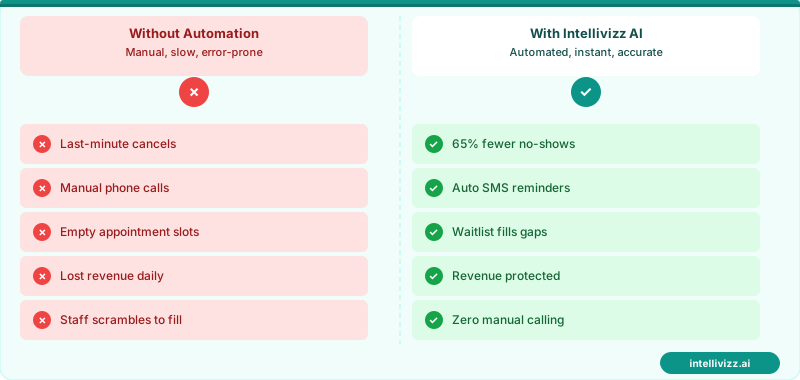
📱 Right Channel, Right Time — Confirmation Rates Jump 30–40%
Multi-channel reminder sequences respect patient preferences and dramatically cut no-show rates
Waitlist Automation: Filling Cancellations in Real Time
Appointment cancellations are inevitable in any clinical practice — illness, schedule conflicts, and personal emergencies generate a baseline cancellation rate of 8–15% even in well-managed practices. The question is not how to eliminate cancellations (they cannot be eliminated) but how to recover the cancelled slot before it represents lost revenue. Manual waitlist management — a front desk staff member calling through a paper or spreadsheet waitlist to fill an opening — typically recovers 20–40% of cancelled slots, depending on staff bandwidth and the time of day the cancellation occurs. Automated waitlist management recovers 60–75% of cancelled slots by instantly notifying every patient on the waitlist the moment a cancellation is processed, with a first-to-respond self-booking mechanism that fills the slot without any staff involvement.
The automation operates as follows: when a cancellation is received — whether via patient portal, SMS reply, or phone call — the system marks the slot as available and simultaneously broadcasts a personalized waitlist notification to all patients who have expressed interest in earlier or alternative appointment times. The notification is urgent-toned and time-limited ("An appointment is available for Tuesday at 2:15 PM — reply YES to claim it in the next 30 minutes"). The first patient to respond claims the slot; the system immediately books the appointment, confirms to the patient, and notifies remaining waitlisted patients that the slot has been filled. For practices with significant waitlist demand — common in high-demand specialties and underserved geographic markets — this automation can recover 10–20 previously lost appointment slots per month.
| Reminder Timing | Channel | Confirmation Rate Lift | Best For |
|---|---|---|---|
| 7 days before | +8–12% vs. no reminder | Distant appointments scheduled months out | |
| 48 hours before | SMS | +18–25% vs. no reminder | Standard appointments, primary anchor reminder |
| 24 hours before | SMS + voice | +22–30% vs. no reminder | Same-week bookings, high-risk no-show patients |
| 2 hours before | SMS | +5–8% additive | High no-show history patients only |
Practices building out a full appointment management automation stack — covering scheduling, reminders, cancellation handling, and waitlist management — will find the workflow framework in AI appointment scheduling for medical offices directly applicable as the upstream system that integrates with reminder and waitlist automation to create a closed-loop appointment lifecycle management solution.
No-Show Recovery: Same-Day Fill and Rescheduling Automation
Despite an optimized reminder sequence, some patients will fail to appear for their appointment without advance cancellation. The post-no-show workflow is as important as the pre-appointment reminder sequence for practice revenue performance. Automated no-show recovery initiates within minutes of a missed appointment: a text message acknowledging the missed visit, providing a one-click link to reschedule, and offering the next available appointment time for that appointment type. For practices with waitlist functionality, the no-show slot is simultaneously broadcast to the waitlist (if there is sufficient time to fill it same-day), maximizing the likelihood that the revenue opportunity is recovered even if the original patient does not rebook immediately.
No-show documentation is equally important from a compliance and risk management standpoint. Automated systems create a timestamped record of the missed appointment, the no-show outreach attempt, and the patient's response (or non-response). For medical practices with value-based care contracts where care gap performance is measured, this documentation supports the practice's reporting of care outreach attempts for patients who are difficult to engage. For practices managing patients with complex care plans where missed appointments represent a safety concern, the documented outreach record and escalation pathway provide a defensible record of diligent follow-up that manual processes cannot consistently produce at scale.
Ready to modernize your practice? Explore our healthcare automation solutions, or read our guide to How to Reduce No-Shows in Your Medical Practice:....