
Automated Patient Intake Forms: Eliminate Clipboards and Cut Check-In Time by 70%
Why Paper Intake Forms Are Costing Your Practice
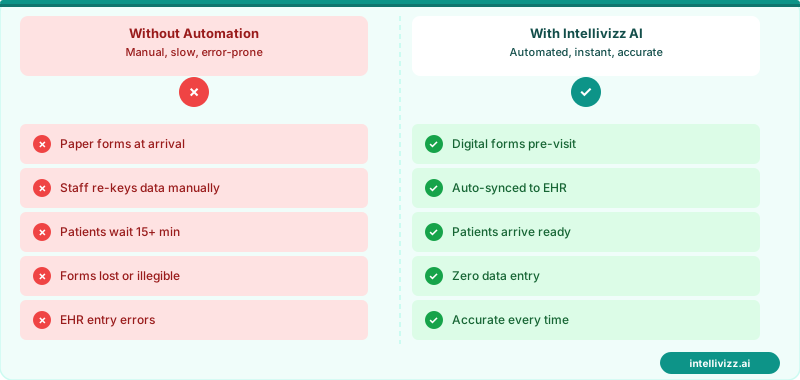
The clipboard-and-pen intake form has been a fixture of medical offices for decades — and it's been causing problems for just as long. Patients arrive 15 minutes early to fill out the same forms they completed last year, staff spend 8-12 minutes per patient re-entering handwritten data into the EHR, and 20% of those manual entries contain errors that cascade through billing, prescriptions, and care coordination.
For a practice seeing 40 patients per day, that's 320-480 minutes of staff time daily — roughly 1.5 full-time employees — dedicated solely to transcribing paper forms into digital records. At $18-$22/hour, that's $45,000-$55,000 annually in direct labor costs for data entry that shouldn't need to happen.
🏥 Patients expect instant responses — automation delivers
See how automation transforms industry operations
What Automated Intake Looks Like
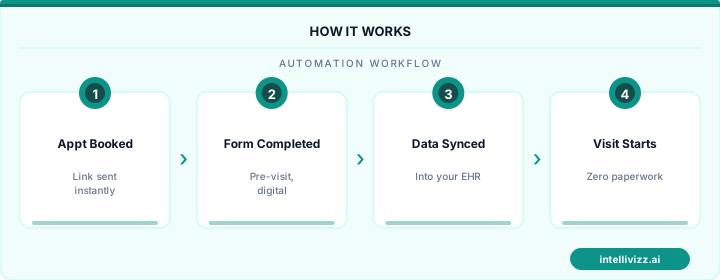
Modern automated intake replaces the clipboard with a digital workflow that starts before the patient arrives:
Pre-Visit (48-72 Hours Before)
The system sends a text or email with a link to your intake forms. Patients complete demographics, medical history, medications, allergies, insurance information, and consent forms from their phone or computer. Pre-populated fields pull data from the previous visit, so returning patients only confirm or update rather than re-entering everything.
Check-In (Day Of)
When the patient arrives, their information is already in your system. Check-in takes 2-4 minutes instead of 15 — just identity verification, copay collection, and any last-minute updates. Some practices use tablet kiosks for patients who didn't complete forms at home; even in-office digital entry is 40% faster than handwriting.
Post-Check-In (Automatic)
Data flows directly into your EHR without manual entry. Insurance is verified in real time, flagging coverage issues before the patient is roomed. Clinical staff can review the patient's updated history before entering the room.
Impact on Practice Efficiency
Practices that implement automated intake consistently report:
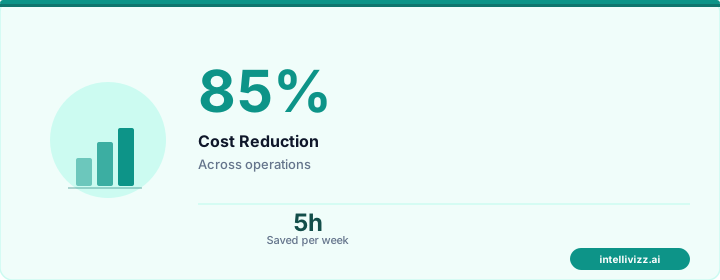
- 70% reduction in check-in time — from 15 minutes to 4 minutes average
- 85% reduction in data entry errors — structured digital fields prevent the illegible handwriting problem
- 40% reduction in front desk staff time spent on intake-related tasks
- 30% decrease in claim denials due to more accurate demographic and insurance data
- 15-point improvement in patient satisfaction scores related to the check-in experience
Insurance Verification Integration
The highest-ROI feature of automated intake isn't the forms themselves — it's the real-time insurance eligibility check that happens when patients submit their information. Instead of discovering at checkout that a patient's insurance lapsed or a procedure isn't covered, you know 48 hours in advance.
This single feature prevents an average of $2,500-$4,000/month in write-offs from unverified insurance. Combine this with automated payment collection and you've closed two major revenue leakage points simultaneously.
🏥 Patients expect instant responses — automation delivers
From manual processes to automated excellence
Choosing the Right Platform
Not all digital intake solutions are equal. Key criteria for medical practices:
EHR Integration
The platform must write directly to your EHR — not create a separate database that requires manual reconciliation. Look for native integrations with your specific system (Epic, Athena, eClinicalWorks, etc.) or HL7/FHIR compatibility for custom connections.
HIPAA Compliance
All patient data must be encrypted in transit and at rest, with a signed BAA from the vendor. Ensure the platform doesn't store completed forms on patients' devices and offers automatic session timeout for shared computers.
Mobile-First Design
75% of patients will complete intake on their phone. The interface must be thumb-friendly — large touch targets, minimal typing, dropdown selections where possible, and photo capture for insurance cards instead of manual ID entry.
Multilingual Support
Practices serving diverse communities need forms available in multiple languages. The best platforms offer 20+ languages with clinically validated medical terminology translations, not just Google Translate output.
Implementation Timeline
Most practices can go from decision to live digital intake in 2-4 weeks:
- Week 1: Configure form templates, set up EHR integration, customize branding
- Week 2: Staff training, workflow mapping, test with 10-15 volunteer patients
- Week 3: Soft launch — offer digital intake as an option alongside paper
- Week 4: Full rollout — digital as default, paper as fallback only
Within 90 days, most practices see 80-90% digital adoption rates. The remaining 10-20% (typically elderly patients) can use in-office tablets with staff assistance or continue with paper forms that are scanned and OCR-processed rather than manually entered.
Pairing automated intake with an AI front desk system creates a seamless patient experience from first phone call through check-in, with every data point captured digitally from the start.
Frequently Asked Questions
What about patients who aren't tech-savvy?
In-office tablets with large text and simple interfaces accommodate patients who struggle with smartphones. Staff can also complete the digital form alongside the patient, which is still faster and more accurate than paper transcription.
How do you handle patients who show up without completing pre-visit forms?
Have 2-3 tablets at check-in loaded with the intake forms. Digital in-office completion still takes 6-8 minutes — half the time of paper — and eliminates the data entry step entirely.
Does digital intake increase no-shows?
The opposite. Pre-visit engagement (completing forms, confirming insurance, reviewing instructions) increases appointment attendance by 8-12% because patients have invested time and feel committed to the visit.
📋 Paper intake is a liability. Digital intake is a competitive advantage.
Automated intake reduces admin time by 60% and improves data accuracy.
Beyond the Form: What Automated Intake Actually Delivers
The obvious benefit of digital intake forms is eliminating paper. But the real value is in what happens downstream. When intake data flows directly into your EHR or practice management system, three things happen simultaneously: staff data-entry time drops to near zero, intake information is available to the provider before the patient walks in (enabling a more informed first interaction), and the data is structured and searchable in ways that paper never could be.
Practices that have implemented automated intake consistently report the same unexpected benefit: improved patient satisfaction scores. Patients prefer completing intake from their phone at home over filling out clipboards in a waiting room. The pre-visit intake process becomes part of the patient experience — and it can be designed to feel welcoming rather than administrative.
Designing Intake Forms That Patients Actually Complete
Completion rates for digital intake forms vary widely — from 45% (poorly designed) to 92% (well-designed). The variables that matter most: form length (under 10 minutes is the threshold), mobile optimization, and the timing of the send (48–72 hours before the appointment is optimal; too far in advance and patients forget, too close and they don't have time). Multi-page forms with progress indicators outperform single long-scroll forms by 18–24% on completion rate.
Best practice: send intake forms 48 hours before the appointment with a 24-hour reminder if not completed. Include a "complete in 8 minutes" time estimate in the message — it reduces abandonment by 30%.
| Intake Design Factor | Impact on Completion Rate |
|---|---|
| Mobile optimized | +22% |
| Time estimate included in message | +30% |
| Sent 48 hrs before (vs. day before) | +18% |
| Progress indicator on multi-page form | +24% |
Automated intake pairs seamlessly with patient recall systems — see how patient recall system automation can extend the relationship beyond the first visit.
Ready to modernize your practice? Explore our healthcare automation solutions, Medical Practice Workflow Automation: Streamline..., or AI Appointment Scheduling for Medical Offices: Beyond....
Relevant AI Automations
AI Review Management (HIPAA-Compliant)
All-in-one HIPAA-compliant review management: automated review requests, AI-powered responses, and review repurposing for web & social.
HIPAA-Compliant AI Voice Agent — 24/7 Patient Call Handling
HIPAA-compliant AI voice agent answers every patient call 24/7 — triages urgency, books appointments, and sends encrypted follow-ups
Website Live Chat → Patient Booking Funnel
AI-powered live chat on the practice website engages visitors, answers questions about services/insurance, collects cont