
Private School Admissions CRM: Managing the Inquiry-to-Enrollment Pipeline
The Admissions Office Has a Different Problem Than the Academic Office
Private school administrators frequently conflate two distinct software needs: the student information system (SIS) that manages enrolled students' academic records, transcripts, schedules, and grades, and the admissions CRM that manages prospective families through the inquiry-to-enrollment pipeline. These are not the same tool, and using one for both purposes creates operational dysfunction in whichever function is being served by the wrong system.
The SIS is a backward-looking system of record: it documents what has happened to enrolled students across their academic careers at the school. The admissions CRM is a forward-looking pipeline management system: it tracks prospective families from first contact through enrollment, managing the sequence of touchpoints, decisions, and administrative actions that convert an inquiry into an enrolled student.
An admissions office operating without a dedicated CRM — or using a generic SIS module that was designed as an afterthought — is managing a high-stakes, high-volume sales and relationship pipeline in a system that was not designed for it. Inquiries are tracked in spreadsheets. Tour RSVPs are managed in email inboxes. Application status is documented in the SIS before an application is formally submitted. Waitlist priority is maintained in a separate document that three staff members maintain inconsistently. Yield management — the critical process of converting accepted students to enrolled students — happens through ad-hoc outreach with no systematic tracking.
The admissions offices with the highest yield rates, the most efficient operations, and the best family experience during the admission process have built or adopted dedicated admissions CRM systems that manage the full pipeline from first inquiry to first-day enrollment.
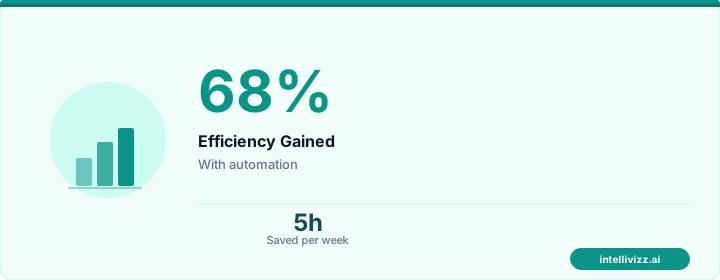
🏫 The Pipeline from First Inquiry to First Day
An admissions CRM manages what a student information system was never designed to handle
Inquiry Tracking from First Touch
The inquiry stage is the top of the admissions funnel — the point at which a family first signals interest in the school. Inquiries arrive through multiple channels: website contact forms, phone calls, email, social media, referrals from current families, feeder school outreach, and open house attendance. Each of these channels should funnel into a single inquiry record in the admissions CRM, with the source channel tracked for later analysis of which acquisition channels produce the highest yield to enrollment.
First-Touch Inquiry Response
The admissions CRM should trigger an automated first-touch response within minutes of inquiry receipt — a personalized acknowledgment that includes the family's name, the prospective student's name (if provided), and relevant next steps based on the inquiry channel and grade level of interest. This response should feel personal, not templated, and should include immediate value: a link to schedule a campus tour, access to the school's viewbook or program overview, and the admissions contact's direct information.
Response speed at the inquiry stage matters more than most admissions offices realize. Families exploring private school options are often simultaneously inquiring at two to five schools. The school that responds with warmth and specificity within the first hour earns a positioning advantage in the family's comparison process. Delayed responses — or worse, the automated form confirmation email that does nothing but acknowledge receipt — signal organizational disorganization at the first moment of impression.
Inquiry Record Structure
Each inquiry record in the admissions CRM should capture:
- Parent/guardian contact information (primary and secondary contacts, preferred communication channel)
- Student's name, current grade, and target enrollment grade/year
- Inquiry source (website form, phone, referral — and if referral, the referring family or school)
- Inquiry date and initial response date/time
- Current school attended (for feeder school relationship tracking)
- Geographic information (zip code, distance from campus — relevant for transportation and yield probability)
- Specific programs of interest (if noted: arts, athletics, STEM, faith-based programming, etc.)
- Initial qualification notes from the admissions officer's first contact
Tour and Open House Management
Campus tours and open house events are the most critical conversion point in the admissions pipeline. Research across independent schools consistently shows that families who complete a campus visit enroll at a significantly higher rate than those who do not visit — typically 40–60% higher conversion to application, and 25–35% higher yield from application to enrollment. Managing tour and open house capacity, RSVPs, confirmations, and follow-up is a significant operational task that the admissions CRM should handle systematically.
Tour Scheduling Automation
The admissions CRM should provide a real-time tour scheduling interface — accessible from the inquiry response email and the school website — that shows available tour slots, allows families to self-schedule, and automatically adjusts capacity as slots fill. This eliminates the back-and-forth email exchange for tour scheduling that consumes significant admissions staff time during peak inquiry seasons (typically September–November and January–March for most independent schools).
The tour confirmation sequence should include:
- Immediate booking confirmation with date, time, parking/arrival instructions, and the name of their assigned admissions guide
- A 48-hour reminder with a brief preview of what the tour will cover and an invitation to prepare questions
- A same-day reminder with directions and a contact number for day-of questions
- A post-tour follow-up within 24 hours, including any materials referenced during the tour and a direct invitation to next steps (application, additional visit, Q&A session)
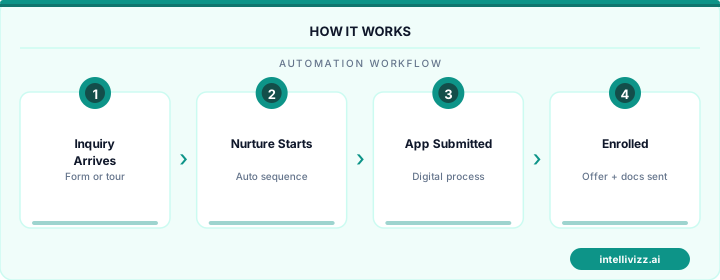
🚪 Every Tour and Open House, Seamlessly Managed
Families who visit campus convert to applicants at 40–60% higher rates than those who don't
Open House RSVP Management
Open houses — larger events designed for multiple prospective families simultaneously — require capacity management, session assignment (for larger schools running multiple concurrent sessions), and event-specific follow-up. The admissions CRM should manage open house RSVPs with the same structure as tour scheduling: registration page, capacity limits by session, automated reminders, and post-event follow-up sequences that differ from individual tour follow-ups based on the group experience.
Application Status Pipeline
The application pipeline is where the admissions CRM earns its most direct return on investment. A private school application process typically spans multiple stages over several months, with multiple parties involved: the family, the admissions office, teachers who complete recommendation forms, the student (for upper school applicants completing essays), and the admission committee. Managing the status and next actions across dozens or hundreds of concurrent applications manually — even with a well-organized spreadsheet — is error-prone and time-consuming.
Pipeline Stage Design
An effective admissions pipeline typically includes these stages, each with automated actions and deadline tracking:
| Pipeline Stage | Definition | Automated Actions |
|---|---|---|
| Inquiry | First contact; no application initiated | Response sequence; tour invitation |
| Toured / Engaged | Campus visit completed; active relationship | Post-visit follow-up; application invitation |
| Application Started | Application portal account created; form begun | Completion reminders; missing materials alerts |
| Application Complete | All materials received; application under review | Acknowledgment; estimated decision timeline |
| Under Committee Review | Submitted to admission committee | Interview scheduling (if applicable) |
| Decision Made | Admission decision reached | Decision letter delivery; yield sequence triggered |
| Accepted — Pending Enrollment | Accepted; enrollment deposit not yet received | Yield management sequence |
| Enrolled | Deposit received; enrollment confirmed | Onboarding sequence; SIS handoff |
| Waitlisted | Not admitted; placed on waitlist | Waitlist communication sequence |
| Declined | Did not enroll after acceptance | Exit survey; long-term nurture (for future years) |
Sibling Tracking and Family History
Private schools with strong alumni families — where siblings follow siblings through the same institution over a decade or more — need the admissions CRM to maintain a complete family history that predates the current application cycle. When a family with a current 9th-grade student inquires about enrollment for a younger sibling, the admissions officer should see, in the sibling's inquiry record: the current enrolled student's name and grade, the family's payment history, any significant relationship notes from previous admissions cycles, and whether the family is in good standing.
Sibling priority in admissions decisions — a standard policy at most independent schools — should be tracked and applied systematically through the CRM rather than relying on the admissions team to remember or manually check family connections. A sibling priority flag in the admissions pipeline ensures that this policy is applied consistently and documented clearly for committee review.
Feeder School Relationship Management
Upper schools and secondary schools with strong feeder school relationships — the elementary and middle schools that reliably send students — should track those relationships in the admissions CRM as institutional records, not just family records. The CRM should show, for each feeder school: how many students have inquired from that school in the current cycle, how many have applied, how many have been admitted, and historical yield rates. This data supports strategic relationship management: which feeder school relationships merit cultivation visits, which guidance counselors to stay in contact with, and where there are gaps in outreach that could be filled.
Admission Committee Workflow
The admission committee — the group of faculty, administrators, and sometimes current parents or alumni who review applications and make admission decisions — needs a workflow that is collaborative, documented, and efficient. The admissions CRM should provide:
- A committee review view that displays all relevant application materials in a single screen without requiring the reviewer to navigate between multiple systems or documents
- A structured rating or evaluation form that captures each committee member's assessment consistently
- A comment and discussion thread within the application record for committee deliberation
- A decision recording workflow that captures the final decision, any conditions attached (additional documentation, probationary enrollment terms), and the committee members present at the decision
- Automatic triggering of the decision communication sequence upon decision recording
Yield Management: Accepted to Enrolled
Yield management — the process of converting accepted students to enrolled students — is where admissions CRM investment pays the most direct dividend. The national average yield rate for private K-12 schools (the percentage of accepted students who enroll) is approximately 60–75%, but top-performing schools consistently achieve 80–90% yield through systematic cultivation of accepted families during the decision window.
The yield window — typically the period between admission decision delivery and the enrollment deposit deadline — is a critical relationship management period. The admissions CRM should trigger a structured yield sequence the moment an acceptance is recorded:
- Decision day: Personalized acceptance communication (phone call from admission director, followed by formal letter/email). Not a form letter — a message that references something specific about the student or family from the admissions process.
- Week 1 post-acceptance: An invitation to a yield event — a program-specific preview day, a current-student Q&A session, or a department head meeting — designed to deepen the family's connection to the school community before they have committed.
- Week 2–3: Touchpoints from relevant stakeholders: a note from a faculty member in the student's area of interest, an invitation from a current student ambassador, a connection to a current parent in a relevant affinity group.
- Enrollment deadline – 2 weeks: A warm reminder of the enrollment deadline with a direct link to the enrollment deposit portal. An offer to answer any remaining questions before the decision is made.
- Enrollment deadline – 3 days: Final reminder with a personal outreach from the admission director expressing genuine enthusiasm for the student joining the community.
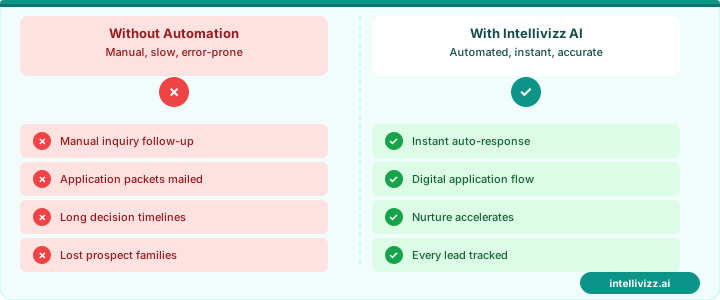
🎯 Systematic Yield Management Adds 10–20 Enrollment Points
Top independent schools convert accepted families at 80–90% with structured cultivation
Waitlist Management
The admissions waitlist is one of the most operationally delicate components of the admissions pipeline. Waitlisted families are in a state of uncertainty that requires careful communication: enough information to maintain their interest and goodwill, but not promises that create expectations the school cannot fulfill. The admissions CRM should track:
- Waitlist position (where prioritization is disclosed) or waitlist category (priority vs. standard vs. program-specific)
- The family's response to waitlist placement — whether they wish to remain on the waitlist or have withdrawn
- Waitlist communication history — every touchpoint sent to and received from the family during the waitlist period
- Movement trigger records — when slots open due to enrolled student withdrawals and which waitlisted family was offered the slot
Waitlisted families who are handled with transparency and warmth during the waitlist period frequently become advocates for the school even if they ultimately enroll elsewhere — and they represent a future application pool for younger siblings or for families who move to the school's geographic area in subsequent years.
SIS Integration: The Enrolled Student Handoff
The final stage of the admissions CRM workflow is the transition from prospect to enrolled student — the handoff between the admissions office and the registrar, academic office, and business office. This handoff should be automatic and complete: upon enrollment deposit receipt and enrollment confirmation, the student record in the admissions CRM should populate the relevant fields in the SIS without manual data re-entry.
Data that should transfer automatically: student name and date of birth, parent/guardian contact information, grade level and enrollment year, program selections (if made during enrollment), tuition payment plan election, and any relevant admissions notes (learning support needs, scholarship awards, athletic program placements) that the academic or student services team needs to be aware of.
Manual re-entry of enrollment data from the admissions CRM to the SIS is a significant source of data quality errors and administrative time waste. The integration investment pays for itself in error prevention alone, before considering the staff time recovered.
For the enrollment automation systems that complement the admissions CRM — including the digital enrollment packet, the new family onboarding sequence, and the payment plan setup workflow — our guide to private school enrollment software covers the full digital enrollment stack. And for the school communication systems that serve families throughout the academic year after enrollment is confirmed, our guide to school communication automation provides the operational framework.
Ready to modernize your school's operations? Explore our education automation solutions, School Enrollment Automation: Streamlining the..., or How to Increase Private School Enrollment: A Complete....