
Automated Review Requests for Medical Practices: The Complete Setup Guide
Medical practices that automate their review requests collect 3-5x more Google reviews than those relying on manual processes. For a doctor-specific approach, see our guide on automating Google reviews for doctors. The difference isn't effort — it's consistency. Automation ensures every patient receives a timely, personalized review request without depending on busy staff to remember.
This guide walks through the complete technical setup of automated review requests for medical practices, from EHR integration to message optimization and compliance safeguards.
Why Manual Review Requests Fail in Healthcare
Healthcare environments are uniquely challenging for manual review collection. Staff are managing check-ins, insurance verification, clinical handoffs, and phone calls simultaneously. Asking them to also send review requests introduces a task that consistently gets deprioritized when the day gets busy.
The data proves it: practices that start with manual review requests see a 75-80% drop in consistency within 90 days. Automation eliminates this decay entirely by removing human memory from the equation.
⭐ Your online reputation is your #1 marketing asset
From manual processes to automated excellence
The Automated Review Request Workflow
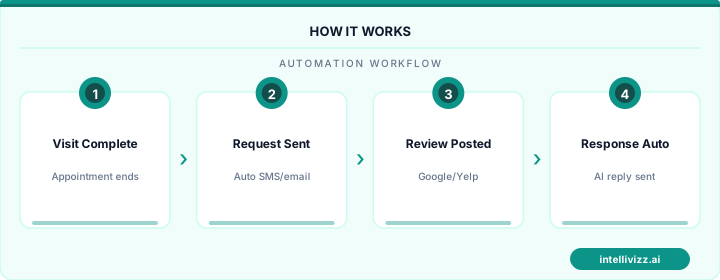
A well-designed automated system follows this flow:
- Appointment completion trigger: When a patient checks out or their appointment status changes to "Completed" in your EHR/PMS, the automation activates.
- Delay period: The system waits 1-3 hours to let the patient leave the office and settle back into their day.
- First touchpoint (SMS): A personalized text message with the patient's first name and a direct Google review link.
- Second touchpoint (Email, +24h): A follow-up email with slightly different wording for patients who prefer email.
- Final reminder (SMS, +72h): A last gentle nudge, only if no review has been detected.
This 3-step sequence maximizes conversion without over-messaging. Each additional touchpoint captures patients who missed or ignored the previous one.
HIPAA Compliance Checklist
Before activating any automated review system, verify these compliance requirements:
- Business Associate Agreement (BAA): Your automation platform must sign a BAA if it processes or stores patient contact information.
- No PHI in messages: Review request messages must never reference treatments, diagnoses, medications, or specific health details. Stick to: "Thank you for visiting [Practice Name] today."
- Opt-out mechanism: Every automated message must include a way for patients to stop receiving messages (e.g., "Reply STOP to opt out").
- Secure data transmission: Patient contact data should be transmitted over encrypted channels between your EHR and the automation platform.
- Consent documentation: Ensure your intake forms include consent for receiving post-visit communications. Most standard intake forms already cover this.
For more on HIPAA requirements for AI-powered patient communication tools, see our detailed HIPAA compliance guide.
EHR and PMS Integration Options
The trigger for your automated review requests needs to come from your scheduling or EHR system. Here are the common integration approaches:
Direct API Integration
Modern EHR systems like athenahealth, DrChrono, and Kareo offer APIs that can push appointment status changes to external platforms in real-time. This is the gold standard — zero manual work, instant trigger activation.
Webhook/Zapier Bridge
For EHR systems without direct API support, tools like Zapier can bridge the gap. When an appointment status changes, Zapier detects it and triggers the review request workflow in your automation platform.
Daily Batch Export
Some legacy systems only support CSV exports. In this case, export your daily completed appointments and upload them to your automation platform. This introduces a slight delay but still achieves automation.
Check-Out Trigger
If technical integration isn't feasible, use a manual check-out trigger. When front desk staff complete the check-out process, they click a single button that activates the review sequence. This is semi-automated but far more consistent than fully manual approaches.
⭐ Your online reputation is your #1 marketing asset
See how automation transforms industry operations
Optimizing Your Messages for Maximum Conversion
Message optimization can double your conversion rate. Here are the key factors:
Personalization: Messages that include the patient's first name convert at 2x the rate of generic messages. If possible, include the provider name too: "Dr. Smith's team hopes your visit went well."
Brevity: SMS messages should be under 160 characters. Email subject lines under 40 characters. The review request should be the primary (ideally only) call to action in the message.
Direct link: Use your Google Business Profile short link. Every intermediate page or extra click reduces conversion by 40-60%.
Timing: The 1-3 hour delay window is optimal. Under 1 hour feels premature (patient may still be in the parking lot). Over 4 hours and the appointment is fading from memory.
Day-of-week performance: Review requests sent Tuesday through Thursday convert 15-20% higher than weekend messages. Avoid Friday afternoons and Sundays.
Platform Comparison for Medical Practices
Three categories of platforms handle automated review requests:
Standalone review tools (Podium, Birdeye, Reputation.com): Purpose-built for reviews. Strong analytics and multi-platform support. Cost: $250-500/month. Best for practices that only need review automation.
Healthcare-specific platforms (Luma Health, Solutionreach): Built for medical practices with integrated appointment reminders, patient communication, and review requests. Cost: $300-600/month. Best for practices wanting healthcare-specific features.
All-in-one automation platforms (Intellivizz): Combine review requests with broader automation workflows — missed call text-back, appointment reminders, patient reactivation, and lead follow-up. Cost: competitive with standalone tools. Best for practices wanting to consolidate multiple tools into one platform.
Measuring Performance
Track these metrics weekly to optimize your system:
- Send rate: What percentage of completed appointments trigger a review request? Target: 95%+
- Open rate: SMS should be 90%+, email should be 25%+
- Click rate: What percentage click the review link? Target: 15-25% for SMS, 5-10% for email
- Conversion rate: Reviews generated / requests sent. Target: 10-18%
- Review velocity: New reviews per month. Track the trend line, not individual months.
If your conversion rate drops below 8%, test new message copy. If your send rate is below 90%, investigate the EHR integration for missed triggers. Continuous optimization compounds — small improvements in conversion rate translate to significant review volume gains over 6-12 months.
Automated review requests aren't a competitive advantage anymore — they're table stakes for any medical practice that wants to maintain visibility in local search. The practices that set up automation this month will be the ones dominating the Google Local Pack by year's end.
Ready to modernize your practice? Explore our healthcare automation solutions, or read our guide to How to Get More Google Reviews for Your Medical....
Relevant AI Automations
AI Review Management (HIPAA-Compliant)
All-in-one HIPAA-compliant review management: automated review requests, AI-powered responses, and review repurposing for web & social.
HIPAA-Compliant AI Voice Agent — 24/7 Patient Call Handling
HIPAA-compliant AI voice agent answers every patient call 24/7 — triages urgency, books appointments, and sends encrypted follow-ups
Website Live Chat → Patient Booking Funnel
AI-powered live chat on the practice website engages visitors, answers questions about services/insurance, collects cont