
Automated Review Request Systems: How They Work and Which to Choose
An automated review request system is software that sends personalized review invitations to your customers after a purchase, appointment, or service interaction — without any manual work from your team. The best systems send multi-channel requests (SMS + email), time them for maximum conversion, include direct links to your Google review page, and track results so you can optimize over time.
If you're still relying on your front desk to remember to ask for reviews, you're leaving your online reputation to chance. Businesses using automated review request systems generate 3-5x more monthly reviews than those relying on manual processes — and this applies across industries, from healthcare to accounting firms automating their review collection, and the gap widens every month as reviews compound.
How Automated Review Request Systems Work
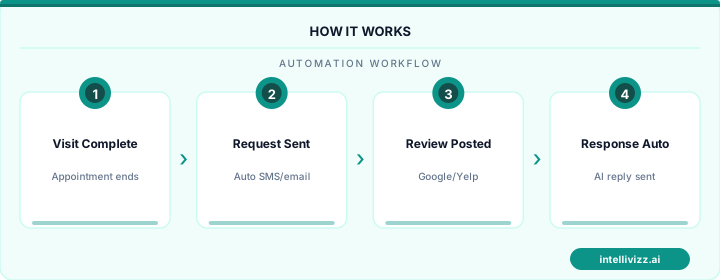
The core workflow is straightforward:
- Trigger: A customer completes an appointment, transaction, or service interaction. The trigger can come from your CRM, scheduling software, POS system, or be set manually.
- Timing: The system waits for a configurable delay — typically 1-4 hours — before sending the first request. Sending too early feels aggressive; too late and the experience fades.
- Channel: A personalized text message or email is sent with the customer's name, the service they received, and a direct link to leave a Google review.
- Follow-up: If the customer doesn't leave a review within 24-48 hours, an automatic reminder is sent. Most systems allow 2-3 follow-up touches before stopping.
- Monitoring: The system tracks which requests were opened, which led to reviews, and your overall review velocity over time.
The most effective systems add a sentiment filter — a quick "How was your experience?" screen before the review link. Happy customers are routed to Google; unhappy customers are routed to a private feedback form where you can address their concerns before they become public reviews.
⭐ Your online reputation is your #1 marketing asset
The data speaks for itself
Top Automated Review Request Systems Compared
Intellivizz Review Automation
Part of the broader Intellivizz AI platform, the review automation module integrates with your appointment scheduling, CRM, and AI receptionist. Review requests are triggered automatically after each interaction — no manual tagging or list uploading required.
Standout features: Multi-step SMS/email sequences, sentiment pre-screening, Google review direct links, integration with the AI receptionist's post-call workflow, HIPAA-compliant for healthcare.
Best for: Businesses already using (or considering) AI automation for calls, scheduling, or lead management — the review module adds zero incremental complexity.
Birdeye
Birdeye is a dedicated reputation management platform with strong review request automation. It supports multiple review sites (Google, Yelp, Facebook) and includes social media monitoring.
Standout features: Multi-platform review requests, social listening, competitive benchmarking.
Limitations: Expensive for small businesses, no AI receptionist or scheduling integration, enterprise-oriented.
Podium
Podium focuses on text-based customer communication with review invitations as a core feature. Its clean interface makes review requesting simple, but it's essentially a messaging tool with review features bolted on.
Standout features: Clean SMS interface, payment collection, webchat widget.
Limitations: No AI phone answering, limited automation logic, per-location pricing gets expensive.
NiceJob
NiceJob is a lightweight review generation tool that's affordable and easy to set up. It automates review requests via email and SMS and can publish reviews to your website as social proof.
Standout features: Simple setup, review widget for website, affordable entry pricing.
Limitations: Limited to review collection — no broader automation capabilities, basic reporting.
What to Look for in a Review Request System
SMS Capability Is Non-Negotiable
Email-only review requests convert at 5-10%. SMS review requests convert at 15-25%. If the system doesn't support text messaging, it's leaving significant review volume on the table. The best strategies for getting more Google reviews rely heavily on SMS as the primary channel.
Direct Google Review Links
The system should generate a direct link that opens the Google review form with your business pre-selected and the star rating interface ready. Every extra click reduces conversion by roughly 50%.
Integration With Your Existing Tools
The review system should connect to whatever triggers customer interactions in your business — your scheduling software, CRM, POS system, or AI receptionist. Manual triggers defeat the purpose of automation.
Compliance for Regulated Industries
If you're in healthcare, your review request system must be HIPAA compliant. This means encrypted messaging, proper data handling, and no inclusion of protected health information in review requests. A message saying "Thank you for your root canal today!" violates HIPAA. A message saying "Thank you for visiting Dr. Smith's office!" does not.
Sentiment Pre-Screening
A sentiment filter routes unhappy customers to a private feedback form instead of Google. This isn't about suppressing negative reviews — it's about giving you the opportunity to resolve issues before they become public. Many "negative" experiences can be recovered with a quick phone call.
Setting Up Your Review Automation: Step by Step
- Choose your trigger source: Connect the system to your scheduling software, CRM, or POS so review requests fire automatically after each customer interaction.
- Set your timing: Configure the initial request for 1-2 hours post-visit, first follow-up at 24 hours, final follow-up at 72 hours.
- Personalize your message: Include the customer's first name and a reference to your business. Keep it under 160 characters for SMS. Example: "Hi [Name], thanks for visiting [Business]! If you had a great experience, we'd love a Google review: [link]"
- Add sentiment screening: Insert a quick satisfaction check before the Google link. Route positive responses to Google, negative responses to a private feedback form.
- Set response caps: Limit to 3 touches per customer per interaction. Respect opt-outs immediately.
- Monitor and optimize: Track open rates, click rates, and review conversion rates weekly. A/B test message variations monthly.
⭐ Your online reputation is your #1 marketing asset
Smart technology, better results
Frequently Asked Questions
Is it okay to automate Google review requests?
Yes. Google allows businesses to ask customers for reviews, including through automated systems. What Google prohibits is offering incentives (discounts, gifts, money) in exchange for reviews, or selectively soliciting reviews only from satisfied customers. Your system should request reviews from all customers equally.
How many reviews per month should I expect?
With an automated system, expect a 15-25% conversion rate on SMS requests. If you send 200 review requests per month, that's 30-50 new reviews. For perspective, the top-ranked local business in most markets has 200-500 total reviews, so consistent monthly volume compounds quickly.
Can I use review automation for multiple locations?
Yes. Most platforms support multi-location setups with location-specific Google review links, branding, and reporting. Ensure each location has its own Google Business Profile configured.
What about review gating — is it allowed?
Review gating (only directing happy customers to leave reviews) technically violates Google's guidelines. However, using a sentiment pre-screen that gives unhappy customers an alternative channel for feedback — while still allowing them to leave a Google review if they choose — is a widely accepted practice. The key is that the Google review option must remain available to all customers.
How does automation affect review authenticity?
Automated requests don't affect authenticity — the customer still writes their own review in their own words. Automation simply ensures the ask happens consistently and at the right time, rather than relying on staff to remember.
Start Automating Your Review Collection
Every day without an automated review system is a day your competitors are outpacing you in local search. The setup takes less than an hour, and the ROI compounds monthly as new reviews boost your visibility, credibility, and customer acquisition.
Ready to see how automated review collection would work for your business? Schedule a demo to see Intellivizz's review automation in action — personalized for your industry and customer workflow.
Ready to get started with automation? Explore our AI automation solutions, or read our guide to AI Review Response Automation: How to Reply to Every....