
School Review Collection Automation: Set It Up Once, Earn Reviews on Autopilot
Manual review collection doesn't work for schools. The foundational principles of getting more Google reviews apply to schools just as they do to any business, and our dedicated guide on how to get more Google reviews for schools covers the school-specific approach in detail. With hundreds of families, seasonal enrollment cycles, and already-overworked administrative staff, the only sustainable approach is automation. Set it up once, and it works continuously — through enrollment season, summer, and everything in between.
This guide walks you through the complete technical setup of an automated review collection system for schools, from choosing the right platform to configuring triggers and measuring results.
Why Schools Need Automated Review Collection
Schools face unique challenges that make manual review requests unsustainable:
- Volume: A school with 300 families can't send individual review requests manually.
- Seasonality: Enrollment decisions happen in specific windows. You need reviews already in place when parents start searching.
- Staff bandwidth: Admissions staff and front-office teams are already stretched thin. Adding manual review requests to their plate guarantees inconsistency.
- Relationship sensitivity: Parents have an ongoing relationship with the school. Automated messages feel less like a personal imposition than a staff member asking face-to-face.
Automation solves all of these by creating a system that runs independently of staff availability, handles volume effortlessly, and maintains a consistent cadence year-round.
⭐ Your online reputation is your #1 marketing asset
Smart technology, better results
Choosing the Right Platform
Schools have three main options for review automation:
Option 1: School-Specific Marketing Tools
Platforms like Finalsite and SchoolAdmin include some review and reputation management features. They're built for education and understand the school context, but their review automation capabilities are typically basic — often limited to email-only campaigns with minimal customization.
Option 2: General Review Platforms
Tools like Podium and Birdeye offer robust review automation but aren't designed for schools. They require more configuration to adapt business-oriented workflows to the school context, and pricing ($250-$500/month) can strain education budgets.
Option 3: All-in-One Communication Platforms
Platforms like Intellivizz combine review automation with broader communication workflows — enrollment follow-up automation, event reminders, parent communication sequences, and missed call text-back. This approach offers the best cost efficiency for schools that want to automate multiple communication channels simultaneously.
For most schools, Option 3 provides the best balance of capability and cost. The review automation component is just one piece of a broader parent engagement system.
Configuring Your Review Triggers
The effectiveness of your automation depends on triggering review requests at the right moments. Here are the key triggers to configure:
Trigger 1: New Enrollment Confirmation
When: 48 hours after enrollment contract is signed
Channel: Email (more formal for this milestone)
Message focus: Welcome + share what drew them to the school
Expected conversion: 8-12%
Trigger 2: First Month Check-In
When: 30 days after student start date
Channel: SMS (casual, quick)
Message focus: How is [student] settling in? + review link
Expected conversion: 15-20% (highest converting trigger)
Trigger 3: Post-Conference Follow-Up
When: 24 hours after parent-teacher conference
Channel: Email
Message focus: Thank you for attending + share your experience
Expected conversion: 10-15%
Trigger 4: Post-Event Engagement
When: 24 hours after major school events (plays, sports, open houses)
Channel: SMS
Message focus: Hope you enjoyed [event]! + review link
Expected conversion: 8-12%
Trigger 5: Year-End Campaign
When: Last week of school year
Channel: Email + SMS sequence
Message focus: Reflecting on the year + help future families
Expected conversion: 12-18% (high emotion moment)
Building the Message Sequences
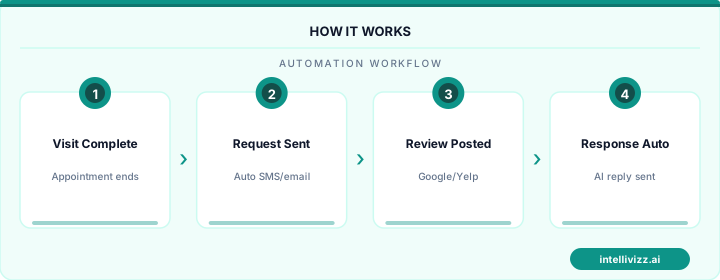
Each trigger should launch a 2-3 message sequence, not a single request. Here's the pattern:
Message 1 (trigger time): Primary request with direct Google review link. Keep it under 160 characters for SMS.
Message 2 (24-48 hours later): Gentle reminder via alternate channel. If Message 1 was SMS, Message 2 should be email (or vice versa). Reference the original request: "Just a quick follow-up on our note yesterday..."
Message 3 (72 hours after Message 1): Final reminder. Only send if no review was detected. Make it the easiest possible: "One last note — if you have 60 seconds, here's the link: [link]. Thank you!"
After three messages, stop. More contact risks annoying parents and damaging the relationship.
⭐ Your online reputation is your #1 marketing asset
The data speaks for itself
Integration with Student Information Systems
The most efficient automation connects directly to your SIS for trigger data. Common integration approaches:
- API integration: If your SIS offers an API (many modern platforms do), connect it directly to your automation platform for real-time trigger events.
- Zapier/webhook connection: For SIS platforms without direct API support, use Zapier to bridge the gap. When a status changes in your SIS, it triggers the automation workflow.
- CSV/manual upload: For schools with limited tech infrastructure, export parent contact lists monthly and upload them to your automation platform as a campaign.
- Calendar sync: Sync your school event calendar so post-event triggers fire automatically without manual scheduling.
Managing Review Volume Throughout the Year
Schools have natural review generation cycles. Optimize your automation calendar:
- August-September (Back to School): High volume from new enrollment and first-week triggers. Your most productive period.
- October-November (Conferences): Post-conference triggers generate a second wave.
- December (Year-End): Holiday sentiment drives generous reviews. Run a gratitude-themed campaign.
- January-March (Enrollment Season): Critical period. You want maximum reviews visible when prospective parents are searching. Focus on reactivation campaigns for existing parents who haven't left a review.
- April-June (Year-End): Year-end campaigns and graduation triggers generate the final wave.
- Summer: Lower volume but alumni family campaigns can maintain some activity.
Measuring and Optimizing
Track these KPIs monthly:
- Total reviews: Cumulative count and monthly velocity
- Conversion rate by trigger: Which moments generate the most reviews? Double down on the winners.
- Channel performance: SMS vs. email response rates. Reallocate budget to the higher-performing channel.
- Rating trend: Monitor your average rating weekly. If it dips, investigate quickly.
- Enrollment correlation: Track whether inquiry and tour volume increases as review count grows.
The most successful schools treat review automation as a permanent system, not a campaign. Configure it once, optimize quarterly, and let it compound your online reputation year after year. Within 12-18 months, you'll have a review profile that no competitor can quickly replicate — giving you a lasting advantage in parent trust and enrollment pipeline.
Ready to modernize your school's operations? Explore our education automation solutions, or read our guide to How to Increase Private School Enrollment: A Complete....
Relevant AI Automations
AI Review Management
All-in-one review management: automated review requests, AI-powered responses, and review repurposing for web & social — 3 engines in 1.
Missed Call Text-Back
Instantly respond to missed calls from prospective parents with AI-powered SMS, capturing enrollment leads 24/7
AI Voice Agent - Inbound
AI answers calls 24/7, handles FAQs about programs, tuition, availability, and books tours