
Copay Collection Automation: Capturing Patient Payments Before They Walk Out the Door
The Point-of-Service Collection Gap Is Costing Your Practice More Than You Think
Every day, medical practices across the country see patients, deliver care, and then spend weeks — sometimes months — trying to collect the money those patients owe. The math is brutal: industry data consistently shows that collecting a patient balance at the point of service costs a practice approximately $8 in administrative effort. Collecting the same balance after the patient has left the building costs $12–$18. And if that balance reaches collections, the cost climbs to $25 or more — on top of collection agency fees that typically consume 30–35% of recovered amounts.
The fundamental problem is not that patients are unwilling to pay. Most patients expect to pay something at their appointment. The problem is that most practices have no reliable system to tell patients — accurately, at the moment of check-in — exactly what they owe. When front-desk staff cannot confidently quote a copay because eligibility has not been verified, the default behavior is to bill later. And billing later means collecting less, slower, at higher cost.
Copay collection automation solves this at three stages: before the visit (eligibility verification and copay estimation), during the visit (point-of-service collection at check-in), and after the visit (post-visit balance recovery sequences). Together they can move a practice from sub-60% point-of-service collection rates to 85–95%.
💳 Collect Before the Visit Ends
Point-of-service automation captures 85–95% of patient responsibility without adding front-desk staff
Real-Time Eligibility Verification: The Foundation of Accurate Copay Collection
A copay collection system that cannot tell a patient what they owe — accurately, in real time — is not a collection system. It is a billing system that generates statements three weeks after the appointment. Real-time eligibility verification is the prerequisite for everything else in copay collection automation.
Modern eligibility verification pulls directly from payer databases via 270/271 EDI transactions or payer-specific APIs. The response returns the patient's current coverage status, plan type, copay amounts by service category (primary care, specialist, urgent care, mental health, preventive), deductible amount and year-to-date accumulator, out-of-pocket maximum and accumulator, and any active prior authorizations relevant to the scheduled appointment. This data populates the patient record in your practice management system before the patient arrives.
Automated Eligibility Batch Verification
For practices with dense appointment schedules, running eligibility checks manually the morning of each appointment is impractical. Automated batch verification runs the prior evening — or 24–72 hours in advance — for every scheduled patient. The system flags exceptions: inactive coverage, changed copay amounts, high deductible balances, plans requiring prior authorization for the scheduled service type. Front-desk staff review the exception queue each morning rather than running individual verifications for 40 patients before the first provider arrives.
Integration with major PM systems is mature for this function. Athenahealth's eligibility module runs real-time verification at the time of scheduling and flags coverage status changes. eClinicalWorks integrates with Change Healthcare and Availity for batch and real-time verification. NextGen Healthcare offers both as part of its revenue cycle management suite. If your PM system is not natively running automated eligibility checks 24–72 hours before each appointment, this is the first automation to implement.
Automated Copay Estimation: Telling Patients What to Bring
Once eligibility data is available, automated copay estimation calculates the expected patient responsibility for the scheduled visit and communicates it to the patient in advance. This pre-visit communication accomplishes two things: it eliminates the "I didn't know I'd have to pay today" conversation at check-in, and it gives patients time to arrange payment method before arriving.
Pre-visit patient responsibility messages should be sent 24–48 hours before the appointment, through the patient's preferred channel (SMS or email). The message format matters: it should state the estimated amount clearly, explain what the amount represents (copay, estimated coinsurance, deductible balance), note that it is an estimate that may be adjusted after the claim processes, and include a convenient pre-payment link if your system supports it.
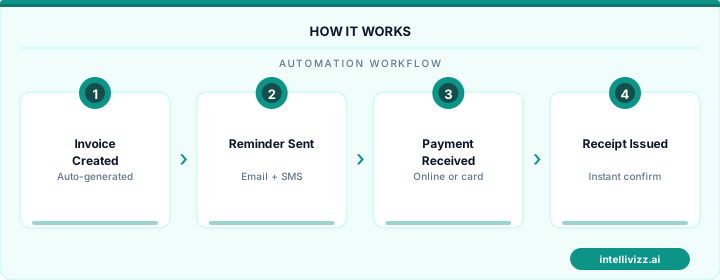
📱 Tell Patients What to Expect Before They Arrive
Pre-visit payment notifications increase point-of-service collection by 25–40%
Pre-Payment Before the Appointment
Pre-payment — collecting the estimated copay before the appointment — is the logical extension of pre-visit estimation. For practices with high no-show rates, pre-payment functions both as a collection mechanism and as a commitment device that reduces abandoned appointments. Patients who have already paid their copay are substantially less likely to no-show. The pre-payment link should route to a mobile-optimized payment experience with a receipt sent immediately, and integration back to the PM system should mark the copay as collected so front-desk staff do not attempt to collect again at check-in.
Point-of-Service Collection: Kiosk and Tablet Check-In
For the patients who do not pre-pay, the check-in experience is the highest-leverage collection opportunity in your entire revenue cycle. Patients at check-in are present, engaged, and completing an administrative process they understand requires payment. The barrier to collection at this moment is minimal — provided the practice has the infrastructure to accept payment efficiently.
Self-Service Kiosk and Tablet Check-In
Self-service check-in kiosks and tablets in the waiting area have moved from novelty to standard equipment at high-performing practices. The check-in flow presents the patient with their verified insurance information, their estimated responsibility amount, and a payment interface — without front-desk staff involvement. Patients enter their credit or debit card, complete payment, and receive a digital receipt while their arrival is logged in the PM system.
The psychological dynamic of kiosk payment versus human payment collection is meaningful. When a front-desk staff member asks a patient for their copay across a counter, the interaction carries social friction — patients may feel judged, push back on the amount, or express frustration with their insurance. A kiosk presents the same information as a neutral transaction, similar to paying for parking or a retail purchase, and compliance rates are measurably higher.
| Collection Method | Collection Rate | Staff Time Required | Patient Friction |
|---|---|---|---|
| Post-visit paper statement | 45–60% | High (billing staff) | Low at visit |
| Front-desk verbal request | 65–75% | Medium (check-in staff) | Medium |
| Pre-visit digital estimation + request | 75–85% | Low | Low |
| Self-service kiosk / tablet check-in | 85–92% | Minimal | Very Low |
| Pre-payment link (before appointment) | 88–95% | Minimal | Very Low |
Card-on-File Programs
Card-on-file programs store a patient's payment method securely (via tokenization compliant with PCI DSS) and charge the verified copay amount automatically at the time of the visit, subject to patient consent. The patient checks in, their card is charged for the copay amount confirmed by eligibility verification, and a receipt is sent to their email. There is no payment collection conversation at the front desk at all.
Card-on-file programs require clear patient consent at enrollment and transparent communication about when charges will be applied. Implemented correctly, they achieve the highest point-of-service collection rates of any method — and the highest patient satisfaction, because the check-in experience is faster and simpler.
Insurance vs. Patient Responsibility: Getting the Split Right
One of the most common sources of billing errors and patient disputes is incorrect assignment of the insurance/patient split at the time of service. If the eligibility check pulls stale data — a deductible that has already been met, a copay amount that changed at plan renewal, or a secondary insurance not loaded into the record — the practice collects the wrong amount at point of service and faces either a refund or an additional balance bill after claim processing.
The most accurate practices implement a post-adjudication reconciliation step: when the EOB returns from the payer, the system compares actual patient responsibility against the amount collected at point of service. Discrepancies generate either a credit balance or a balance bill workflow. Automated as a nightly batch process, this eliminates the manual work of comparing each EOB to the visit charge.
For practices dealing with the upstream problem — claims that are denied before patient responsibility can even be determined — our guide to insurance claim denial follow-up automation covers the systematic approach to denial management that improves clean claim rates and reduces the volume of cases where the patient split is uncertain at point of service.
Payment Plan Automation for Large Balances
Not every patient balance can be collected in full at the point of service. High-deductible health plans have pushed average patient responsibility to $1,200–$3,500 for common procedures. Attempting to collect a $2,400 deductible balance in a single payment at check-in is both impractical and unnecessary — and turning patients away because they cannot pay in full defeats the purpose of the collection system.
Payment plan automation handles this by presenting patients with structured installment options at the point of service or through a post-visit payment portal. A patient owing $800 after a procedure is offered a 4-month plan at $200/month, with automatic charges to their card on file on a schedule they select. The plan is documented, the patient's acknowledgment is captured digitally, and the charges process automatically without billing staff involvement.
The key parameters for an effective payment plan program are: a minimum balance threshold for plan eligibility (typically $150–$200 to avoid administrative overhead for small balances), maximum plan duration (typically 6–12 months for balances under $5,000), and interest policy (most practices offer 0% interest for plans under 12 months to maximize patient participation). For larger balances — post-surgical accounts above $5,000 — some practices integrate third-party patient financing through vendors like CareCredit or Wisetack, which provide longer terms and handle the credit risk entirely.
Our deeper resource on patient payment plan automation covers the full design and implementation of an installment plan program, including patient communication sequences and default management.
Reducing Aging AR Through Automated Post-Visit Follow-Up
Even with strong point-of-service collection systems, some patient balances will remain unpaid after the visit — because the patient was not present at check-in, because the balance was not determinable until after claim adjudication, or because a payment plan was set up and subsequent installments are coming due. Automated post-visit balance follow-up manages this tail of AR without requiring billing staff to manually work aging buckets.
A Tiered Post-Visit Follow-Up Sequence
- Day 1 post-adjudication (T+1): An automated message notifying the patient that their claim has processed and their balance has been determined, with the exact amount and a payment link. This message should arrive promptly after EOB receipt — not 30 days later after the first paper statement.
- Day 14 (T+14): A follow-up reminder if payment has not been received, with a payment plan option prominently offered for balances above $150. Many patients who ignore the first message respond to the second if a payment plan is offered.
- Day 30 (T+30): A second reminder with a stronger urgency message — noting that the balance is now 30 days past due and that the account may be referred to collections if not resolved. Includes a direct phone number for patients who need to discuss their account.
- Day 60 (T+60): Final automated contact before collections referral. This message should be clear about the consequence (collections referral) and offer a final opportunity to set up a payment plan. Practices with robust payment plan programs see 20–30% of accounts in this bucket convert to plans rather than proceed to collections.
For the complete patient billing outreach system — including automated reminders across all balance types, not just copays — see our guide to automated patient billing reminders. And for practices looking at their overall revenue cycle automation strategy, medical practice payment automation covers the end-to-end system from eligibility to final payment.
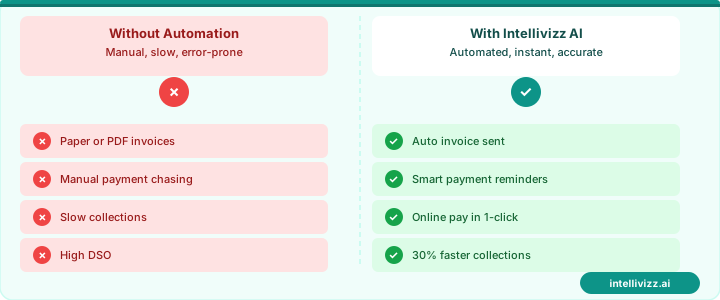
📊 From 90+ Day AR to 30-Day Resolution
Automated post-visit follow-up sequences reduce aging AR by 40–60% without adding billing staff
PM System Integration: Athena, eClinicalWorks, and NextGen
Copay collection automation is only as effective as its integration with your practice management system. The PM system is the authoritative record for patient demographics, insurance information, appointment schedules, charge data, and payment posting. Any automation layer that does not integrate bidirectionally with the PM system creates reconciliation work that consumes the efficiency gains the automation was supposed to deliver.
Athenahealth
Athenahealth's cloud-based architecture is well-suited to automation integration through its published REST API. Eligibility verification is native within Athena's Revenue Cycle Management module and runs automatically for scheduled patients. Patient payment collection through Athena's patient portal (athenaCommunicator) supports pre-visit payment requests, digital statements, and payment plan enrollment. Third-party integrations for kiosk check-in are available through Athena's marketplace. The platform's automated eligibility and billing reminder features are among the most mature in the market.
eClinicalWorks
eClinicalWorks integrates with major clearinghouses (Change Healthcare, Availity, Waystar) for eligibility verification and claims processing. Its Patient Portal supports balance viewing and online payment. eClinicalWorks also offers a proprietary patient engagement module (healow) that supports appointment reminders with balance information, pre-visit payment requests, and post-visit billing communication. The platform's native automation capabilities are strong for practices that stay within the eCW ecosystem; third-party integrations require API access, which is available but requires vendor coordination.
NextGen Healthcare
NextGen's Patient Experience Platform includes eligibility verification, patient-facing balance communication, online bill pay, and a patient self-scheduling module that can incorporate pre-visit payment requests into the scheduling workflow. NextGen's focus on specialty and enterprise practices means its payment automation features are well-developed for high-complexity billing environments — multi-payer, high-deductible, and complex coinsurance calculations.
Measuring Copay Collection Performance
| Metric | Industry Average (Manual) | Automated Target |
|---|---|---|
| Point-of-service collection rate | 55–65% | 85–93% |
| Eligibility verification rate (pre-visit) | 40–60% | 95–100% |
| Average days to collect patient balance | 45–75 days | 15–30 days |
| Accounts referred to collections | 8–15% | 2–5% |
| Cost to collect (per dollar collected) | $0.12–$0.18 | $0.04–$0.08 |
| Patient balance write-off rate | 12–20% | 4–8% |
For a primary care practice seeing 25 patients per day with an average copay of $35 and an average post-deductible balance of $180, moving from a 60% point-of-service collection rate to a 90% rate represents approximately $1,890 in additional revenue captured per day — before accounting for reduced collection costs and lower write-off rates. At scale, copay collection automation is one of the highest-ROI investments in a practice's revenue cycle technology stack.
The practices that implement these systems most effectively treat copay collection not as a billing department problem but as a patient experience design challenge. When patients arrive knowing what they owe, have convenient payment options, and can complete the financial transaction in 90 seconds at a kiosk or on their phone, copay collection stops being a friction point and becomes a routine, unremarkable part of the visit. That is the goal — not just higher collection rates, but a financial interaction that patients complete easily and without resentment.
The upstream piece — ensuring your insurance verification process catches coverage changes before they create collection problems at the point of service — is covered in depth in our guide to insurance verification automation, which walks through the complete eligibility and prior authorization workflow.
Front-Desk Workflow Redesign for Point-of-Service Collection
Hardware and software alone do not transform copay collection rates. The most significant gains come from redesigning the front-desk workflow so that financial conversations happen at the right moments, with the right staff competencies, supported by the right tools. Practices that deploy self-service kiosks without simultaneously training staff on financial conversation skills and restructuring check-in sequences often see only partial improvement because the workflow context undermines the technology investment.
The core workflow problem in most medical practices is that front-desk staff receive mixed signals about their role in revenue cycle management. They are tasked with patient check-in speed (minimizing wait time), patient experience quality (being warm and welcoming), and financial collection (collecting copays and outstanding balances) — three goals that feel contradictory in the moment. Staff who are uncertain whether to prioritize speed, warmth, or financial collection default to the path of least resistance: completing the check-in without a financial conversation.
Workflow redesign begins with explicit role definition. In practices with the highest point-of-service collection rates, front-desk staff understand that collecting copays at check-in is a core clinical function, not a billing department responsibility temporarily delegated to reception. The framing matters: when staff understand that uncollected copays ultimately reduce the resources available for clinical care and equipment investment, their motivation to complete the collection step changes meaningfully.
Kiosk Hardware Selection: Elo, Samsung, and iPad Platforms
Self-service check-in kiosks have matured significantly from the early touchscreen terminals that plagued healthcare lobbies with confusing interfaces and frequent malfunctions. Current enterprise-grade kiosk platforms offer the processing power, display quality, and integration capabilities needed for effective copay collection workflows.
Elo TouchSystems has established dominance in healthcare kiosk deployments due to its purpose-built medical-grade enclosures, antimicrobial screen coatings, and deep integration with leading practice management systems. The Elo I-Series running Android provides a locked-down, single-purpose experience that IT administrators can manage without specialized kiosk software expertise. The Elo 22-inch upright model is the most common configuration for medical check-in, positioned at counter height for standing use with accessibility provisions for seated patients. Elo hardware carries a higher upfront cost ($1,800-$2,400 per unit) but substantially lower failure rates and longer replacement cycles than consumer-grade alternatives.
Samsung Commercial Display kiosks appeal to practices prioritizing display quality and visual brand consistency. Samsung's Kiosk QM series offers QLED display technology that renders payment prompt screens with significantly higher clarity than LCD alternatives, which reduces patient confusion in brightly lit lobby environments. Samsung's Knox security platform provides enterprise-grade device management, allowing IT staff to push updates, monitor device health, and remotely troubleshoot across a multi-location practice from a central console. Integration with payment processors requires middleware configuration that adds implementation complexity, making Samsung deployments better suited for practices with dedicated IT resources or technology management partners.
iPad-based kiosk configurations using enclosures from manufacturers like Heckler Design or Bouncepad are the most common entry point for small practices because the hardware investment is substantially lower ($400-$800 including enclosure and mount). Practice management software vendors including Modernizing Medicine, Kareo, and Phreesia offer dedicated iPad kiosk applications with pre-configured check-in and payment workflows. iPad kiosks perform well in practices with lower patient volume (under 40 check-ins per day) but show reliability issues at higher volumes due to session management challenges when multiple patients use the device in rapid succession. The iPad's consumer-grade durability also presents challenges in high-traffic clinical environments.
Contactless Payment Technology: Tap-to-Pay, Apple Pay, and HSA/FSA Card Readers
Patient payment friction decreases measurably with every additional payment method supported at point of service. The introduction of contactless payment options — NFC-based tap-to-pay, Apple Pay, Google Pay, and Samsung Pay — has reduced payment completion time at medical check-in kiosks by an average of 40-55 seconds per transaction, which in a busy practice translates directly to waiting room throughput and check-in staffing efficiency.
NFC-capable payment terminals are now table stakes for any new kiosk deployment. The Ingenico Link/2500, Verifone e285, and PAX A920 are the most deployed mobile payment terminals in healthcare point-of-service environments. All three support EMV chip, NFC tap-to-pay, and digital wallet payments. Integration with major practice management systems varies — Athenahealth and Epic have certified integration libraries for all three; smaller PMS vendors may require custom integration work with the payment processor's API.
HSA and FSA card acceptance deserves specific attention because a growing proportion of patients with high-deductible health plans carry dedicated HSA debit cards or FSA benefit cards that can only be used for eligible medical expenses. Standard payment terminals accept these cards as Visa or Mastercard debit, but HSA/FSA transactions require IIAS (Inventory Information Approval System) certification to automatically verify that the charges are medically eligible without manual substantiation from the patient. Medical practices qualify as auto-substantiation merchants under IIAS rules, meaning HSA/FSA card transactions at the point of service do not require patients to submit receipts to their HSA administrator. Practices should confirm that their payment processor and terminal configuration are IIAS-certified to prevent patient confusion and transaction failures when HSA cards are presented.
Tap-to-pay using smartphone digital wallets — Apple Pay, Google Pay — represents the fastest-growing payment modality in healthcare point-of-service environments, driven primarily by patients under 45. Digital wallet transactions are faster (under 3 seconds for a contactless tap), more secure (tokenized payment data eliminates card number exposure), and increasingly preferred by patients who find the experience more convenient than extracting a physical card. Practices that have not yet enabled NFC-capable terminals are beginning to see patient friction comments in satisfaction surveys as digital wallet expectations spread from retail into healthcare settings.
Staff Training on Financial Conversations at Check-In
Technology handles the mechanical aspects of payment processing, but the financial conversation — informing a patient of their copay amount, explaining outstanding balances, and asking for payment at check-in — requires human skill that cannot be automated. Practices with consistently high point-of-service collection rates invest in structured financial conversation training for all front-desk staff, including scenario-based practice and feedback mechanisms.
The most effective financial conversation framework for medical front-desk staff follows a four-step structure. First, lead with care context rather than financial context: "Welcome back, Ms. Chen — Dr. Patel is ready for you. Before I get you checked in, I want to make sure I have your current insurance information." This positions the financial interaction as administrative accuracy rather than collection, which reduces patient defensiveness. Second, state the amount matter-of-factly without apologizing: "Your plan shows a $45 copay today, and you also have a $28 balance from your September visit. Your total today is $73." Third, present payment options as a natural next step: "We can take care of that with credit card, debit, Apple Pay, or your HSA card — whichever is easiest." Fourth, close with completion confirmation: "All set — I'll let Dr. Patel know you're ready."
Practices that role-play this four-step framework with front-desk staff in monthly training sessions report 15-22% higher same-day copay collection rates than practices that rely on ad hoc financial conversation approaches. The training investment is modest — 30-45 minutes of structured practice per staff member per month — with measurable revenue impact that typically exceeds the cost of the training time within the first collection cycle.
Managing pushback and payment difficulty conversations requires a separate training module. Staff need clear protocols for situations where a patient cannot pay their copay at check-in: when to offer a payment plan, who has authority to reduce or waive a copay in hardship situations, how to document financial arrangements in the patient record, and how to communicate the practice's financial assistance policy without making patients feel stigmatized. Practices with documented financial assistance policies and trained staff who can present them compassionately experience higher patient retention after financial difficulty conversations than practices that handle these situations inconsistently.
Point-of-Service Collection Workflows and Financial Clearance
Copay collection automation achieves its highest impact when embedded directly into point-of-service workflows — the clinical and administrative touchpoints where patients physically interact with the practice. These front-desk and kiosk-driven processes represent a fundamentally different operational domain from back-office billing and payment processing systems.
Check-in kiosk workflows transform copay collection from a staff-dependent conversation into a self-service transaction. When a patient arrives and checks in via a tablet or freestanding kiosk, the system can display their verified copay amount, outstanding balance, and payment options before they sit down in the waiting room. Kiosk-based collection eliminates the social discomfort that both patients and front-desk staff experience during face-to-face payment requests. Practices deploying kiosk check-in with integrated payment terminals report point-of-service collection rates 35-45% higher than practices relying solely on verbal staff requests.
Insurance eligibility verification in real time — executed during check-in rather than days before the appointment — catches coverage changes that batch verification misses. A patient whose employer switched insurance carriers on the first of the month may still carry their old insurance card. Real-time eligibility checks via clearinghouse APIs (Availity, Waystar, or Trizetto) confirm active coverage, verify the copay or coinsurance amount for the specific CPT codes scheduled, and flag any prior-authorization requirements. When eligibility verification reveals a lapsed policy, the kiosk or front-desk workflow can immediately present self-pay pricing or offer to reschedule, preventing the uncollectible claim that would otherwise enter the billing cycle.
Real-time adjudication — a capability offered by select payers and clearinghouses — pushes the claims process to the point of service. Instead of submitting a claim after the visit and waiting 14-30 days for an Explanation of Benefits, real-time adjudication returns the payer's allowed amount, patient responsibility, and any denial codes within seconds of the encounter. Practices enabled for real-time adjudication can collect the exact patient responsibility amount at checkout rather than estimating it, eliminating the statement-and-chase cycle that inflates accounts receivable days and collection costs.
Card-on-file tokenization secures a payment method at registration that can be charged for future copays, coinsurance, or balance-after-insurance amounts with the patient's pre-authorization. PCI-compliant tokenization replaces the actual card number with a non-reversible token stored in the practice management system, satisfying PCI DSS requirements without exposing the practice to card-data breach liability. Patients who have a card on file are 3x more likely to pay balances within 7 days of statement generation compared to patients who must manually respond to a paper or electronic statement.
HSA and FSA card acceptance at the point of service requires specific merchant category code (MCC) configuration and inventory information reporting system (IIAS) certification. Practices that accept HSA/FSA cards without proper IIAS certification risk transaction reversals and IRS compliance issues. Automated copay systems must distinguish between HSA-eligible and non-eligible charges, split transactions when a visit includes both eligible medical services and non-eligible cosmetic components, and generate the substantiation documentation that HSA administrators require.
Patient financial counselor roles emerge in practices where copay amounts exceed $75-100 per visit — common in specialist practices with high-deductible health plan patients. Financial counselors intercept patients flagged by the eligibility verification system as having large out-of-pocket obligations, presenting payment plan options, charity care applications, or manufacturer patient assistance programs before the clinical encounter begins. Charity care screening — assessing household income against federal poverty level guidelines to determine eligibility for reduced or waived fees — is a compliance requirement for nonprofit health systems and a goodwill best practice for private practices. Automating the charity care screening questionnaire within the check-in workflow ensures consistent application of financial assistance policies and generates the documentation required for IRS Form 990 Schedule H reporting.
Ready to modernize your practice? Explore our healthcare automation solutions.
Relevant AI Automations
AI Review Management (HIPAA-Compliant)
All-in-one HIPAA-compliant review management: automated review requests, AI-powered responses, and review repurposing for web & social.
HIPAA-Compliant AI Voice Agent — 24/7 Patient Call Handling
HIPAA-compliant AI voice agent answers every patient call 24/7 — triages urgency, books appointments, and sends encrypted follow-ups
Website Live Chat → Patient Booking Funnel
AI-powered live chat on the practice website engages visitors, answers questions about services/insurance, collects cont