
Appointment Reminder Automation: The Universal Guide for Every Service Business
Appointment-based businesses across every industry share a common problem: no-shows drain revenue, disrupt operations, and waste staff time. Reducing appointment no-shows starts with an effective multi-touch reminder strategy. The solution is equally universal — automated appointment reminders reduce no-shows by 29-39% across all service categories. When patients do cancel, cancelled appointment revenue recovery automation can automatically fill that slot. This guide covers the principles and implementation details that apply to any appointment-based business.
The Universal Reminder Framework
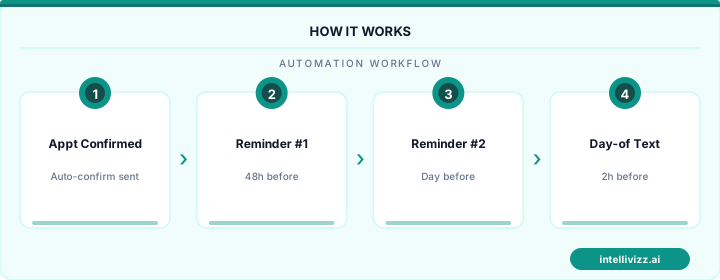
Regardless of your industry, the optimal reminder strategy follows the same structure:
1. Immediate Confirmation
Within 5 minutes of booking: text + email confirming the details, add-to-calendar link, easy reschedule/cancel option, and any preparation instructions.
2. Advance Reminder (3-7 Days Before)
For appointments booked more than a week out: email with detailed information (what to bring, how to prepare, what to expect), links to any pre-appointment forms or documents, and directions and parking information.
3. Day-Before Reminder
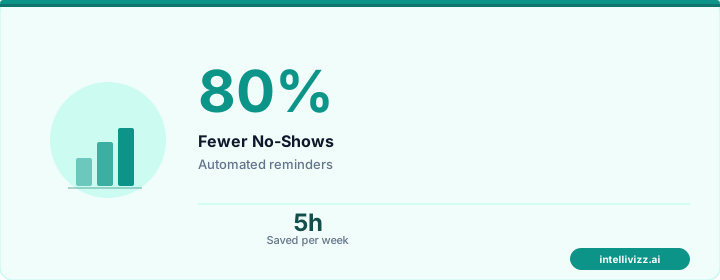
SMS message: short, actionable, includes a 1-tap confirm option. This is the most critical touchpoint — it catches 80% of potential no-shows who need to reschedule.
4. Day-Of Reminder
SMS morning of: final touchpoint with directions and a "we're looking forward to seeing you" tone. This catches same-day cancellations early enough to attempt backfilling.
💡 Automation handles the routine — you handle the growth
The data speaks for itself
Industry-Specific Customization
Medical/Dental: Include prep instructions (fasting, medication, insurance card), HIPAA-compliant messaging, and estimated copay information.
Salon/Spa: Include service description, duration, pricing, and cancellation policy. Request that clients arrive with clean hair (for color services) or other prep.
Legal: Include document requests, parking validation details, and expected meeting duration. Emphasize confidentiality in messaging.
Fitness/Gym: Include class location within the facility, what to bring (towel, water, mat), and instructor name. For personal training, include workout focus.
Restaurant: Include confirmation request, party size verification, and special request reminders. Mention dress code if applicable.
Channel Effectiveness by Industry
SMS is the universal champion with 98% open rates across all industries. Email is best for detailed pre-appointment information. Phone calls (AI-powered) are most effective for high-value appointments (medical procedures, legal consultations, real estate closings) and elderly demographics. Push notifications work well for businesses with apps (fitness, salon chains).
Two-Way Communication Is Non-Negotiable
Every reminder must enable the recipient to respond. One-way notifications reduce no-shows by 15-20%. Two-way reminders (where patients/clients can confirm, reschedule, or ask questions) reduce no-shows by 29-39%. The difference — a 10-19 percentage point improvement — comes from converting potential no-shows into either confirmed or rescheduled appointments.
💡 Automation handles the routine — you handle the growth
Smart technology, better results
Technology Selection
Choose a reminder platform that offers: multi-channel delivery (SMS, email, phone), two-way communication, integration with your scheduling/booking system, customizable timing and templates, confirmation tracking dashboard, and automated escalation for unconfirmed appointments.
Universal KPIs
- Reminder delivery rate: 98%+ for SMS, 95%+ for email
- Confirmation rate: 70-80% of recipients confirm
- No-show rate reduction: 29-39% improvement from baseline
- Self-service reschedule rate: 15-25% of at-risk appointments convert to rescheduled
Automated reminders are the highest-ROI automation for any appointment-based business. Book a free consultation to see reminder automation tailored for your industry.
Psychology of Appointment Reminders: Why Timing and Channel Matter
Appointment no-shows are not primarily caused by forgetfulness — they are caused by friction. When canceling is harder than not showing up, patients and clients choose the path of least resistance and simply don't appear. Effective reminder automation addresses this by making confirmation and rescheduling equally easy — eliminating the asymmetry that favors no-shows. Research from the healthcare and service industries consistently shows that reminders with a simple one-tap confirmation action (not just passive notifications) reduce no-shows by 40-65% compared to reminders that require a phone call to confirm.
The timing of reminders follows a diminishing-returns curve. A single reminder sent 24 hours before an appointment reduces no-shows by approximately 25-30%. Adding a 48-hour reminder improves that to 40-45%. Adding a 7-day reminder improves it further to 50-55%. A morning-of confirmation nudge (sent 2-3 hours before the appointment) adds another 8-12% reduction. The optimal sequence for most service businesses is therefore four touchpoints: 7 days, 48 hours, 24 hours, and morning-of — each serving a different behavioral function.
The 7-day reminder serves as a calendar anchor, giving clients enough time to reschedule without penalty if a conflict has emerged. The 48-hour reminder triggers the decision: the client either confirms they're attending or realizes they need to cancel and still has time to act. The 24-hour reminder catches last-minute conflicts and serves as the final rescheduling opportunity. The morning-of nudge reduces same-day no-shows among clients who intended to come but lost track of the time.
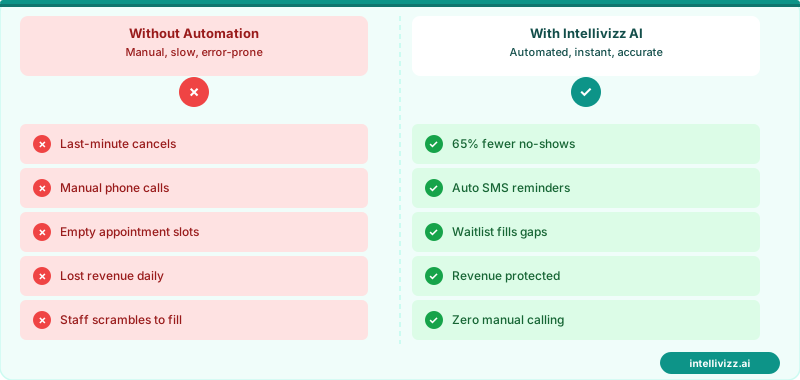
⏰ 4-touch reminder sequences reduce no-shows by up to 65%
One-tap confirmation links remove the friction that causes clients to skip appointments.
Industry-Specific Reminder Configuration Best Practices
Reminder automation configuration varies significantly by industry. Healthcare providers must comply with HIPAA in reminder content — appointment reminder messages cannot include the reason for the visit (diagnosis, treatment type) without explicit patient authorization for that disclosure. A compliant healthcare reminder says "You have an appointment at [Practice Name] on [Date] at [Time]" rather than "Reminder: Your colonoscopy is scheduled for Tuesday." This constraint is important when configuring automated systems for medical, dental, or mental health practices.
For professional services (legal, financial, accounting), reminders should emphasize preparation: what documents to bring, what to review in advance, what decisions to be ready to make. A reminder for a tax preparation appointment that says "Please bring your W-2s, 1099s, and prior year return" dramatically reduces wasted consultation time and increases client satisfaction. Law firm reminders should include any required retainer payment confirmation alongside the appointment details. Coaching and therapy reminders may include a brief check-in question ("How are you feeling about our upcoming session? Reply to let your coach know") that both confirms attendance and provides therapeutic context.
| Industry | Avg. No-Show Rate (Pre-Automation) | Post-Automation | Key Reminder Element |
|---|---|---|---|
| Healthcare | 18–24% | 5–9% | HIPAA-compliant + prep instructions |
| Dental | 12–18% | 4–7% | Procedure-specific prep |
| Legal | 8–12% | 2–4% | Document checklist + payment confirmation |
| Accounting/Tax | 6–10% | 2–4% | Document checklist |
| Personal Services (salon, spa) | 14–20% | 4–8% | Easy reschedule link |
Building a Waitlist System to Maximize Schedule Utilization
Reminder automation creates a secondary opportunity: a waitlist system that fills cancelled slots automatically. When a patient or client cancels via the reminder link, the system immediately scans the waitlist for the next eligible party and sends them an offer for the newly available slot. A well-managed automated waitlist can fill 70-85% of cancelled appointments within 2 hours of cancellation — turning what would have been lost revenue into a recovered booking with zero staff involvement.
Building an effective waitlist requires capturing waitlist preferences at booking: preferred days and times, maximum lead time for a same-day offer (some patients can take a same-day offer; others need 48 hours), and urgency level (is this a wait-and-see situation or is the patient actively seeking the earliest possible appointment). The automated system matches cancellations against these criteria and sends offers to the best-matched waitlisted patient first. Integrating waitlist automation with your broader appointment management reduces your average schedule utilization gap from 12-15% to under 5%. For practices ready to implement this, AI automation for medical practices covers the full ecosystem of tools that complement reminder automation.
Measuring and Optimizing Your Reminder Automation System
Appointment reminder automation is one of the few practice investments that produces directly measurable, trackable ROI from day one. The core metric is straightforward: compare your no-show rate before automation with your no-show rate after. Most practices find this comparison compelling enough to make reminder automation permanent, but optimizing beyond baseline requires tracking at a more granular level — no-show rates by appointment type, by provider, by day of week, by reminder channel, and by patient segment (new vs. established, insurance type, age group).
This granular tracking reveals optimization opportunities. If no-show rates for Friday afternoon appointments remain elevated despite reminders, the reminder timing or message content may need adjustment for that specific slot. If a particular appointment type consistently has higher no-show rates than others (orthopedic follow-ups vs. primary care visits, for example), procedure-specific reminder content may help. If patients who receive email reminders have higher no-show rates than those who receive SMS, shifting those patients to SMS (or adding SMS as a second channel) addresses the gap.
The optimization process should also track confirmation rates — what percentage of patients actively confirm their appointment through the reminder link or reply. Confirmation rate is a leading indicator of no-show rate: if confirmation rates are dropping for a particular slot type or patient segment, no-show rates will follow. Catching this signal early allows proactive intervention — additional reminder touchpoints, staff outreach for high-value appointments, or waitlist management for appointments at risk of no-showing. Practices that move from passive monitoring to active optimization of their reminder systems typically achieve no-show rates in the 3–6% range, compared to 10–15% for practices using basic single-touch reminder systems.
The practices and service businesses that implement appointment reminder automation today and measure its impact carefully are building a compounding operational advantage. Each percentage point reduction in no-show rate improves schedule revenue, frees staff time for higher-value work, and improves the patient or client experience for everyone whose appointment is kept. Over three to five years, these compounding improvements produce practice economics that are structurally superior to competitors relying on manual reminders or no systematic reminders at all. The technology investment is modest and the ROI is demonstrable within 60 days. The question is not whether to implement reminder automation, but how quickly to extend it from the first channel to a full multi-channel, multi-touchpoint system that maximizes the benefit across every appointment type and client segment in your practice or business.
Ready to get started with automation? Explore our AI automation solutions, No-Show Recovery Automation: Turn Missed Appointments..., or Cancellation Backfill Automation: Fill Empty Slots in....