
Tax Document Collection Automation: End the Annual Chaos Without Adding Staff
The Document Gathering Problem That Breaks Tax Seasons
Every CPA firm and tax preparation practice in the United States experiences the same annual crisis between January and April: clients who received their W-2s in January still haven't sent them in mid-February. Business clients with complex returns haven't gathered their bank statements, 1099s, and depreciation schedules. High-net-worth clients with investment accounts, rental properties, and business interests need to be chased across a dozen document types while their tax preparer's queue fills up with other work waiting on the same missing information.
The manual process looks like this: a staff member generates a document request checklist, emails it to the client, waits a week, sends a reminder, waits again, calls the client, gets a partial document set, realizes the K-1 from a partnership is missing, sends another email, discovers the client forgot they sold a rental property in October, repeats. Per client, a complex individual return can require 4–8 document follow-up interactions over 3–6 weeks before the preparer has everything needed to start the return.
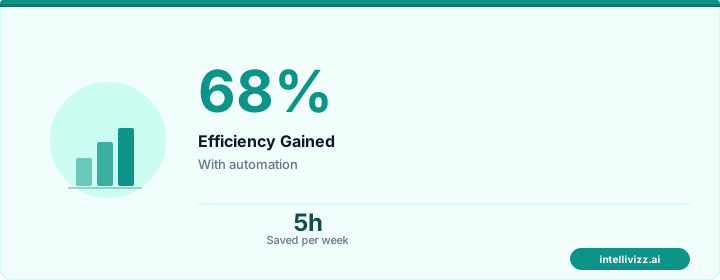
Across a practice with 300 individual returns and 80 business returns, that's easily 2,000–4,000 manual follow-up interactions per tax season — an enormous operational burden that falls disproportionately on the weeks and days when return deadlines are approaching and staff are already stretched to capacity. Tax document collection automation eliminates the majority of this manual burden by creating systematic, automated reminder sequences that escalate appropriately without requiring staff attention until a client is genuinely unresponsive after multiple automated attempts.
💡 Automation handles the routine — you handle the growth
The data speaks for itself
The State of Client Document Delivery in 2026
Before designing an automated collection system, it helps to understand how clients actually deliver documents today — because the answer varies enormously across client segments, and a one-size-fits-all approach is unlikely to be optimal:
Email Submission
A large portion of clients, particularly older individuals and small business owners who have worked with their CPA for many years, are accustomed to emailing documents as attachments. This method is familiar and low-friction for clients, but creates operational problems for the firm: documents arrive in a staff member's inbox without systematic organization, may exceed attachment size limits for large document sets, create version control confusion when clients send corrections, and create compliance concerns around data security for sensitive financial information transmitted through unencrypted email.
Client Portal Submission
Client portal platforms (SafeSend, TaxDome, Canopy, SmartVault, ShareFile) provide a structured, secure document collection environment with clear organization, encryption in transit and at rest, and integration with tax preparation software. The challenge is client adoption: many clients are resistant to creating yet another account and learning another platform. Firms that have invested in portal-based collection typically report 60–70% client adoption after two to three years of active encouragement — meaning 30–40% of clients still use alternative methods regardless of firm preference.
Physical Drop-Off
A meaningful minority of clients — particularly older individuals, those in rural areas with limited tech comfort, and some business owners who prefer physical document control — still deliver tax documents in person or by mail. This remains a valid collection channel that automation must accommodate: the automated system needs to recognize when a client has confirmed they'll drop off documents and suspend email/SMS reminders that would be confusing to a client who has already confirmed their delivery method.
AI-Powered Document Collection
Emerging in 2025–2026, AI-powered document collection systems go beyond passive portals by actively guiding clients through the document submission process, identifying missing items from the documents already received, and flagging apparent discrepancies (a 1099-INT from an institution not mentioned in prior-year documents) that may indicate an overlooked account. These systems dramatically reduce the back-and-forth that consumes so much staff time and represent the direction the industry is moving toward.
Document Checklist Automation by Client Type
One of the most valuable features of automated tax document collection is the ability to send customized checklists that reflect each client's specific tax situation — rather than the generic 40-item checklist that overwhelms individuals with simple returns and under-captures information from complex clients.
Individual Returns (W-2 Employees, Simple Returns)
The basic checklist for a single W-2 employee without investments, rental property, or business income is short: W-2 from each employer, 1099-INT from savings accounts, 1099-DIV from investment accounts (if any), proof of any charitable contributions claimed, health insurance marketplace forms (1095-A if applicable), and prior-year return for comparison. An automated system that sends this client a 35-item checklist including depreciation schedules and partnership K-1s creates confusion and erodes trust.
Individuals with Investment Income
Clients with brokerage accounts, mutual funds, and retirement account distributions need expanded collection: 1099-B from all brokerage accounts with cost basis information, 1099-R from any IRA or 401(k) distributions, Form 5498 for IRA contributions, wash sale reports if available, and records of any investment account sales during the year. For clients with stock options or restricted stock units, add Form 3921 or 3922 and records of any RSU vesting events.
Business Owners and Self-Employed
Small business clients represent the most complex document collection scenarios. A sole proprietor needs all business income records, expense receipts or categorized bank statements, mileage logs if claiming vehicle expenses, home office documentation if applicable, and estimated tax payment records. An S-corp or partnership owner needs all of the above plus the corporate or partnership return itself (if prepared separately), officer compensation records, and shareholder/partner loan documentation.
For small business clients, automated collection sequences should begin earlier — ideally in December for calendar-year businesses — to allow time for year-end accounting reconciliation before the individual return preparation begins. A December reminder that asks business clients to have their bookkeeper finalize December bank reconciliations by January 15 is more useful than a February reminder that the year-end financials are due immediately.
Trusts and Estates
Trust and estate returns require specialized document sets: trust agreement documentation for first-year filings, all trust income statements (1099s directed to the trust's EIN), K-1s from any partnerships or S-corps held in trust, real estate records for any property transactions, and distribution records for amounts paid to beneficiaries. Automated checklists for trust clients must be configured separately from individual client templates and ideally maintained year-over-year with carryforward of the trust's specific asset profile.
Automated Reminder and Escalation Sequences
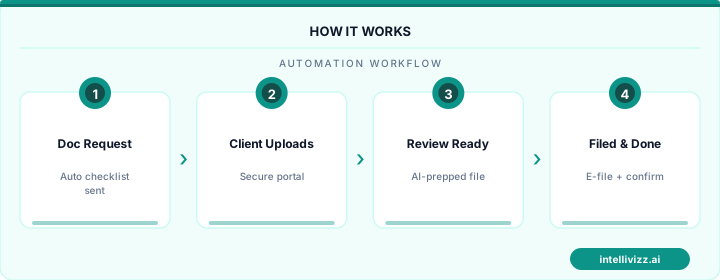
The core value of tax document collection automation is the systematic escalation sequence that eliminates manual follow-up for the majority of clients who simply need prompting rather than hand-holding. An effective escalation sequence works as follows:
Week 1 (Mid-January): Initial Document Request
The season-opening communication is sent to all active clients. It includes the customized document checklist for their situation, instructions for submitting via the firm's preferred channel (portal link, secure email, or appointment scheduling for in-person delivery), a clear deadline (typically March 1 for most individual clients), and a preview of what to expect if documents aren't received: "We'll send a few gentle reminders as the deadline approaches."
Week 3 (Late January): First Reminder
For clients who haven't yet submitted any documents, the first automated reminder goes out 2 weeks after the initial request. Tone is helpful and low-pressure: "Just a quick note that we haven't yet received your tax documents. If you've already submitted them, thank you — no action needed. If not, here's a quick link to submit." This message also serves as a soft check on whether documents were submitted through a channel that wasn't automatically logged (e.g., physical drop-off that wasn't recorded by staff).
Week 5 (Early February): Second Reminder with Deadline Emphasis
The second reminder adds mild urgency by emphasizing the deadline and the consequences of late submission: "To ensure your return is prepared and filed on time, we need your documents by [deadline]. Returns missing key documents after this date may require an extension filing." For clients with complex returns where early delivery is important for scheduling purposes, this message may also mention preparer availability concerns.
Week 7 (Mid-February): Partial Document Follow-Up
For clients who have submitted some but not all required documents, the system can generate a personalized follow-up that lists specifically what's still outstanding: "We've received your W-2 from Employer A and your 1099-INT from First National Bank. We're still waiting for: your 1099-B from Brokerage Account (typically received by mid-February), your home mortgage interest statement (Form 1098), and your charitable contribution receipts." This targeted follow-up is dramatically more useful to clients than a generic "please send your documents" reminder and reduces back-and-forth significantly.
Week 9 (Late February): High-Priority Escalation
At this point in the season, outstanding documents should trigger escalation to human follow-up: a personal phone call or email from the assigned preparer or client manager. The automated system flags these clients and either generates a task for the staff member or (in more sophisticated implementations) sends a personalized message from the preparer's email address explaining that they're unable to begin the return without the outstanding items and asking for a status update by a specific date.
💡 Automation handles the routine — you handle the growth
Smart technology, better results
Secure Document Handling Requirements
Tax documents contain some of the most sensitive personal and financial information that exists — Social Security numbers, full financial account details, business revenue figures, medical expense records, and more. The handling of this information carries both regulatory obligations and client trust implications that must be addressed in any automated collection system.
IRS Publication 4557: Safeguarding Taxpayer Data
IRS Pub 4557 requires that all tax preparers who receive, process, or store taxpayer data implement a written data security plan that includes access controls, encryption standards, incident response procedures, and staff training requirements. Automated document collection systems must be evaluated against this framework: does the portal use encryption in transit (TLS 1.2 or higher) and at rest (AES-256)? Are access logs maintained? Is the vendor SOC 2 Type II certified? These are not optional requirements — they are conditions for compliant operation under IRS standards and, for firms operating in states with data security laws (California, New York, Colorado, Virginia), may be legally mandated.
SOC 2 Type II Certification
For firms handling high volumes of sensitive client data, requiring SOC 2 Type II certification from document collection vendors is the appropriate baseline. SOC 2 Type II certification means an independent auditor has tested the vendor's security controls over a period of at least 6 months (typically 12 months) and verified that those controls operated effectively throughout the audit period. This is meaningfully more rigorous than SOC 2 Type I (which only verifies that controls exist at a point in time) and provides much stronger assurance about ongoing security practices.
Data Retention and Disposition
Client tax documents must be retained for the period required by IRS and state regulations (generally 7 years for business records, 3 years for most personal records, longer for returns with special circumstances). After the retention period expires, documents should be securely disposed of rather than simply deleted — which may mean verified deletion from cloud storage platforms and confirmation that backup copies are also destroyed. Automated systems should support document lifecycle management rather than creating indefinite digital accumulation.
Integration with Tax Preparation Software
The value of automated document collection multiplies when the collection system integrates with the tax preparation software where returns are actually prepared. Integration enables documents collected in the portal to flow directly into the preparation workflow without manual re-entry or file transfer:
| Tax Software | Integration Capability | Key Benefit |
|---|---|---|
| Drake Tax | API + file import | Direct document attachment to return; status sync |
| UltraTax CS (Thomson Reuters) | GoSystem integration | Portal integration via FileCabinet CS |
| Lacerte (Intuit) | SmartVault native integration | Document auto-attachment to client file |
| ProConnect Tax (Intuit) | Native client portal | Integrated document request and collection |
| CCH Axcess (Wolters Kluwer) | Client Collaboration portal | Direct workflow integration within CCH suite |
| TaxDome (standalone CRM/portal) | API to multiple tax software | Central document hub with automation workflows |
Efficiency Gains: What Firms Are Actually Seeing
CPA firms that have implemented automated tax document collection report efficiency improvements that are substantial and measurable:
- 60–80% reduction in manual follow-up for clients who respond to automated reminders — which in most practices is 70–80% of the client base
- 35–50% earlier average document receipt — clients who receive systematic automated reminders submit documents earlier in the season, allowing more even distribution of preparation work rather than a February lull followed by a March avalanche
- 50% reduction in per-return data entry time when automated collection feeds directly into preparation software rather than requiring staff to scan, rename, and manually attach physical documents
- 25–40% reduction in extension filings — firms with systematic collection automation file significantly fewer extensions because document gathering bottlenecks are resolved earlier
- 15–25% reduction in overtime hours per tax season, representing substantial cost savings and significant improvement in staff satisfaction and retention
For a firm preparing 400 returns with an average all-in cost of $85 per hour for professional staff, reducing tax season overtime by 200 hours represents $17,000 in direct labor savings — separate from the revenue impact of being able to take on additional clients with the freed capacity.
Firms looking to extend automation beyond document collection into the full client relationship should explore accounting firm automation strategies and new client welcome sequences that reduce onboarding friction at the start of the client relationship. The most efficient firms in accounting are building automated workflows that cover the entire client lifecycle, not just the annual document collection crunch.
Ready to grow your firm with automation? Explore our professional services automation solutions, or read our guide to CPA Firm Client Onboarding Automation: Cut Onboarding....
Relevant AI Automations
AI Review Management
All-in-one review management: automated review requests, AI-powered responses, and review repurposing for web & social — 3 engines in 1.
Missed Call Text-Back for New Prospects
When a prospective client calls but no one answers, the system instantly sends an SMS within 60 seconds offering to sche
Missed Call AI Text-Back
Instantly respond to every missed call with AI-powered SMS, capturing leads 24/7