
Business Workflow Automation with AI: A Practical Guide to Automating Your First 5 Processes
The Case for Starting Now
McKinsey estimates that 30% of tasks in 60% of all occupations can be automated with current technology. That's not a futuristic projection — it's what's possible today. Yet most businesses haven't automated their first workflow, paralyzed by the perceived complexity of AI implementation.
The truth is simpler than the hype suggests. You don't need a data science team, a massive budget, or a 12-month implementation timeline. Modern AI tools are designed for business users, not engineers, and the highest-impact automations can be deployed in days or weeks.
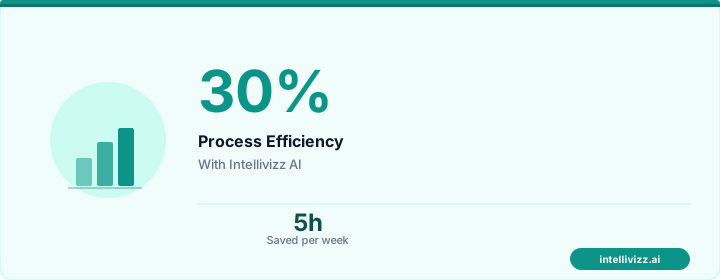
💡 Automation handles the routine — you handle the growth
From manual processes to automated excellence
How to Choose Your First Automation
Not all workflows are equally suitable for automation. Prioritize based on:
- Volume: How often does this task happen? Daily tasks deliver more ROI than monthly ones.
- Consistency: Is the process the same every time, or highly variable? Consistent processes are easier to automate.
- Time cost: How many employee hours does this consume weekly?
- Error rate: Are manual errors causing problems? AI is more consistent than humans for repetitive tasks.
- Customer impact: Does delay in this process affect customers? Automation improves speed and satisfaction simultaneously.
Workflow 1: Customer Communication and Follow-Up
Every business has customer touchpoints that should happen automatically but depend on staff remembering:
- Post-purchase thank you and onboarding messages
- Appointment reminders and confirmations
- Follow-up after service delivery
- Re-engagement for inactive customers
- Review requests after positive interactions
Tools: CRM automation (HubSpot, ActiveCampaign), AI-powered CRM systems
Time to implement: 1-2 weeks
Expected ROI: 3-5x within 90 days
Workflow 2: Phone and Inquiry Handling
For service businesses, phone calls are the lifeblood of revenue — and the biggest bottleneck. AI answering services handle:
- Answering every call on the first ring, 24/7
- Scheduling appointments in real time
- Answering FAQs (hours, pricing, services, location)
- Qualifying leads and routing to the right person
- Taking messages with complete context
Time to implement: 1-2 weeks
Expected ROI: 5-10x (from captured calls that previously went to voicemail)
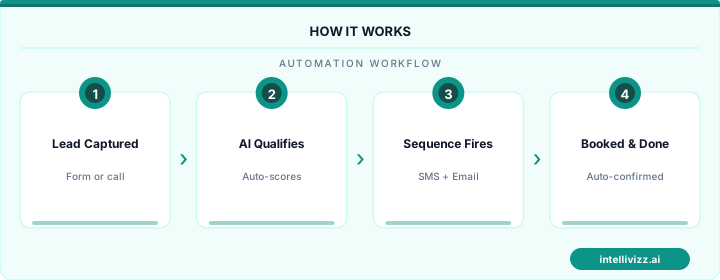
💡 Automation handles the routine — you handle the growth
See how automation transforms industry operations
Workflow 3: Document and Data Processing
Every business processes documents — invoices, contracts, forms, applications. AI document processing:
- Extracts data from PDFs, images, and scanned documents
- Routes documents to the right department or workflow
- Flags discrepancies and missing information
- Populates databases and systems without manual data entry
Tools: DocuSign CLM, ABBYY, custom GPT-based extraction
Time to implement: 2-4 weeks
Expected ROI: 2-4x (primarily labor savings)
Workflow 4: Scheduling and Calendar Management
Scheduling consumes enormous time in businesses that rely on appointments, meetings, or service delivery windows:
- Self-service online booking with real-time availability
- Automated confirmation and reminder sequences
- Intelligent scheduling that considers travel time, preparation, and staff preferences
- Automated rescheduling for cancellations with waitlist backfill
Tools: Calendly, Acuity, industry-specific platforms
Time to implement: 1 week
Expected ROI: 3-6x (from reduced no-shows and captured bookings)
Workflow 5: Billing and Payment Collection
Manual invoicing and payment follow-up is the workflow that most directly impacts cash flow:
- Automated invoice generation and delivery
- Payment reminder sequences (email, text, mail)
- Online payment portals with one-click payment
- Automated payment plan management
- Overdue account escalation workflows
Tools: QuickBooks automation, Stripe Billing, industry-specific platforms
Time to implement: 2-3 weeks
Expected ROI: 4-8x (from faster collections and reduced write-offs)
The Implementation Playbook
- Week 1: Audit — Map your top 5 time-consuming workflows. Quantify hours, error rates, and revenue impact.
- Week 2: Select — Choose the workflow with the highest ROI-to-complexity ratio. Usually communication or phone handling.
- Week 3-4: Implement — Configure the automation tool. Start with basic workflows; add complexity later.
- Month 2: Optimize — Review performance data. Adjust messaging, timing, and rules based on results.
- Month 3+: Expand — Add the next workflow. Each automation builds on the previous one.
Common Mistakes to Avoid
- Automating everything at once: Start with one workflow. Perfect it. Then expand.
- Choosing the wrong first workflow: Pick something high-volume and customer-facing for visible impact.
- Over-customizing: Use the tool's defaults first. Customize only when data shows specific needs.
- Ignoring the human element: Automation should enhance human work, not replace all human touchpoints. Keep personal interaction where it matters most.
- Not measuring: Track before-and-after metrics. Without measurement, you can't prove ROI or identify improvements.
For small businesses in particular, the first automation is transformative — it frees up the owner's or manager's time, generates measurable ROI, and builds confidence for further automation investments.
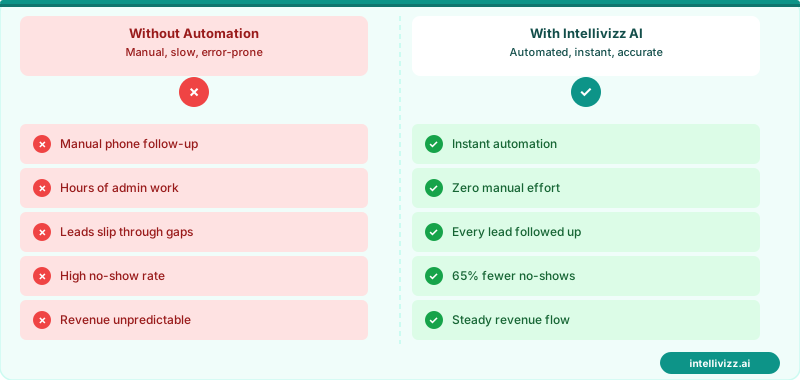
⚙️ Automate the repeatable. Focus on the irreplaceable.
AI workflow automation gives small teams the output of large ones.
The Hidden Cost of Manual Handoffs
Every time work moves from one person or system to another without automation, there's a tax. Tasks sit in inboxes. Context gets lost in translation. Follow-ups fall through the cracks. Research by Asana found that knowledge workers spend 60% of their time on "work about work" — status updates, chasing information, and coordinating tasks that could be automated. For a 10-person team, that's 6 full-time employees producing nothing of direct value to customers.
The first step in workflow automation isn't choosing a tool — it's mapping the handoffs. Every place where a human manually passes information to another human or system is an automation opportunity. Start there, and you'll identify 80% of your highest-leverage automations in an afternoon.
Measuring ROI Before You Build
Before automating any workflow, run a quick three-variable calculation: (1) how many times does this task happen per month, (2) how many minutes does it take per occurrence, and (3) what is the hourly cost of the person doing it. Multiply those three numbers and divide by 60 — that's your monthly cost. Compare it against the automation tool cost plus setup time. Most automations pay back within 60 days.
This calculation also helps you prioritize. A task that happens 200 times a month at 3 minutes each is worth far more to automate than a task that happens twice a month at 30 minutes each, even though the per-occurrence time is similar.
| Workflow Type | Avg. Monthly Hours Saved | Typical Setup Time |
|---|---|---|
| Lead follow-up sequences | 12–20 hrs | 2–4 hrs |
| Appointment reminders | 8–15 hrs | 1–2 hrs |
| Invoice & payment follow-up | 5–10 hrs | 2–3 hrs |
| Review request campaigns | 4–8 hrs | 1 hr |
Once your core operational workflows are running automatically, explore how AI automation can transform small business operations at a deeper level — from customer service to financial reporting.
Ready to get started with automation? Explore our AI automation solutions, Best AI Tools for Business Automation in 2026: A..., or AI Automation for Small Business: Where to Start (A....