
AI CRM Automation: How to Transform Your Customer Relationships on Autopilot
Your CRM is only as good as the data inside it — and the actions you take on that data. The problem? Most teams spend 30-40% of their CRM time on manual data entry, another 20% chasing follow-ups that should have been automated, and the remaining time actually selling. AI CRM automation flips that equation, handling the repetitive work so your team focuses on relationships and revenue.
According to Salesforce's State of Sales report, high-performing sales teams are 2.3x more likely to use AI-guided selling than underperforming teams. For a comprehensive comparison of available options, see our guide to the best AI tools for business automation. But you don't need enterprise Salesforce to get these benefits — modern AI CRM automation is accessible to businesses of every size.
What AI CRM Automation Actually Does
AI CRM automation goes far beyond basic workflow triggers (e.g., "if deal moves to stage 3, send email"). It uses machine learning to make intelligent decisions about how to engage each contact:
Intelligent Lead Scoring
Traditional lead scoring assigns fixed points for actions (downloaded a whitepaper = 10 points, visited pricing page = 20 points). AI lead scoring analyzes patterns across your entire customer base to identify which combinations of behaviors, demographics, and engagement patterns actually predict conversion.
For example, AI might discover that leads who visit your pricing page twice within 48 hours, are in the 10-50 employee range, and come from the healthcare industry close at 4x the rate of your average lead. These insights update dynamically as your data grows — no manual rule maintenance required.
Automated Data Enrichment
When a new contact enters your CRM, AI enrichment automatically fills in the gaps: company size, industry, revenue range, technology stack, social profiles, and recent news. This eliminates the "garbage in, garbage out" problem that plagues most CRMs and ensures every lead has the context needed for personalized outreach.
Smart Follow-Up Sequencing
Instead of one-size-fits-all drip sequences, AI determines the optimal follow-up cadence for each contact based on their engagement patterns:
- Channel selection: Does this contact respond better to email, SMS, or phone calls?
- Timing optimization: When are they most likely to open and respond?
- Content personalization: Which case studies, features, or value propositions resonate with their profile?
- Frequency adjustment: Engaged contacts get accelerated outreach; unresponsive contacts get longer intervals to avoid burning the relationship.
Pipeline Health Monitoring
AI continuously monitors your pipeline for risks and opportunities: deals that have gone quiet and need attention, contacts showing buying signals that warrant immediate follow-up, and stages where deals are getting stuck. Instead of weekly pipeline reviews where problems are discovered days late, AI surfaces issues in real-time.
CRM Data Hygiene and Enrichment
AI-powered CRM automation is only as effective as the data it operates on. Dirty data — duplicates, outdated records, and incomplete profiles — undermines even the most sophisticated automation workflows. Here is how to maintain a clean, enriched database that fuels accurate AI-driven decisions.
Automated Duplicate Detection
Duplicate contacts are the most common CRM data problem, affecting an estimated 25-30 percent of records in the average business database. Configure your CRM's AI to identify duplicates using fuzzy matching across name, email, phone, and company fields — not just exact matches. Set up automated merge rules that preserve the most recent contact information, the longest activity history, and all associated deal records. Run deduplication scans weekly rather than monthly, because duplicates compound faster than most teams realize — every form submission, import, and integration sync creates potential new duplicates.
Progressive Profiling Through Interactions
Instead of asking contacts to fill out lengthy forms, use every interaction as a data collection opportunity. When a lead downloads a whitepaper, capture their industry. When they attend a webinar, note their role and company size. When they respond to an email survey, record their budget range and timeline. AI can orchestrate this progressive profiling by selecting which data point to request next based on what is already known, ensuring you never ask for information you already have. Over six months, progressive profiling builds richer contact records than any single form could capture.
Connecting your CRM enrichment workflows with industry-specific CRM automation ensures that the data you collect maps directly to the segmentation and scoring models that drive your sales process.
Data Decay Prevention Schedules
B2B contact data decays at roughly 30 percent per year — people change jobs, companies rebrand, phone numbers are reassigned. Implement automated data validation that checks email deliverability quarterly, flags bounced emails for review, and prompts contacts to confirm their information annually through a brief update request. Integrate third-party enrichment services that refresh firmographic and technographic data automatically, so your CRM reflects current reality rather than a snapshot from the day the contact was created.
For more on CRM optimization, explore our guide on business workflow automation with AI or learn about CRM strategies for specific industries.
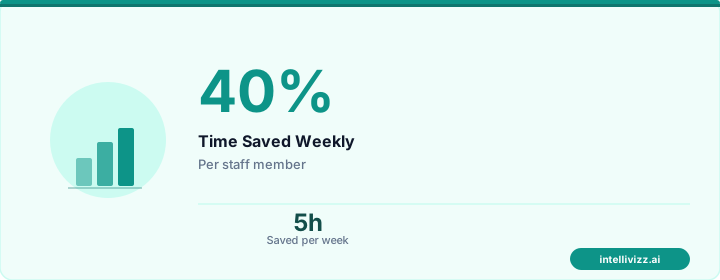
💡 Automation handles the routine — you handle the growth
Smart technology, better results
Practical AI CRM Workflows
Here are five workflows that deliver immediate ROI:
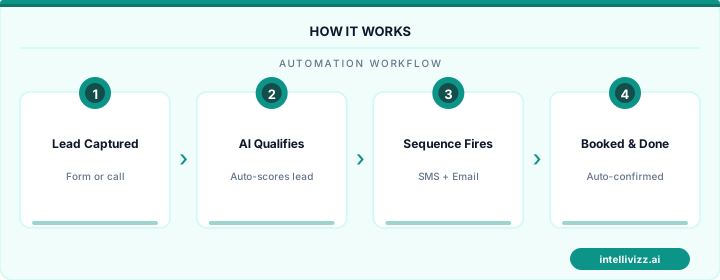
1. New Lead Response (Speed to Lead): When a form is submitted, AI instantly enriches the contact, scores the lead, and routes it. Hot leads get an immediate automated response plus a task for the assigned rep. Warm leads enter a nurture sequence. Cold leads are tagged for future marketing campaigns. The entire process takes under 60 seconds — critical when research shows response time directly impacts conversion rates.
2. Meeting Prep Automation: Before each scheduled meeting, AI compiles a contact brief: recent email interactions, website visits, support tickets, social media activity, company news, and similar customer win stories. Your rep walks in prepared without spending 30 minutes manually researching.
3. Deal Stall Detection: If a deal hasn't progressed in X days (calibrated per stage), AI alerts the rep with suggested next steps: a relevant case study to share, a different stakeholder to engage, or a specific objection-handling resource.
4. Customer Health Scoring: For existing customers, AI monitors engagement signals (support tickets, product usage, communication frequency, payment patterns) to generate a health score. Declining scores trigger proactive outreach from the customer success team before churn becomes a risk.
5. Win/Loss Analysis: AI analyzes patterns across won and lost deals to surface insights: which competitors you win against (and lose to), which objections weren't overcome, and which sales behaviors correlate with closed-won outcomes.
CRM Platforms With Built-In AI
Several CRM platforms now include AI capabilities natively:
- HubSpot: Predictive lead scoring, email send-time optimization, conversation intelligence.
- Salesforce (Einstein): Opportunity insights, automated activity capture, predictive forecasting.
- GoHighLevel: Workflow automation with AI-powered conversation bots, lead scoring, and pipeline management. Particularly strong for agencies and service businesses.
- Pipedrive: AI sales assistant, deal rotting alerts, email analytics.
- Zoho CRM (Zia): Sentiment analysis, anomaly detection, workflow suggestions.
For businesses that need automation across CRM and other systems (phone, scheduling, reviews, payments), an integrated AI automation platform can connect your CRM to your entire operational stack — ensuring data flows seamlessly between customer interactions and your CRM records.
Implementation Best Practices
Start small and expand. The biggest mistake in AI CRM automation is trying to automate everything at once. Begin with one or two high-impact workflows (new lead response and follow-up sequencing are ideal starting points), measure the results for 30 days, then layer in additional automation.
Clean your data first. AI amplifies whatever data it's given. If your CRM is full of duplicate contacts, outdated information, and incomplete records, AI automation will amplify those problems. Deduplicate, standardize, and enrich your data before turning on automation.
Keep humans in the loop. AI should surface insights and execute routine tasks, but human judgment should drive relationship decisions. Set clear escalation rules for when AI should hand off to a human rather than continuing automated engagement.
💡 Automation handles the routine — you handle the growth
The data speaks for itself
Ready to get started with automation? Explore our AI automation solutions, or read our guide to New Client Welcome Sequence Automation: Turn First....