
PE Portfolio Company KPI Dashboard: Design, Data Collection, and LP Reporting Integration
Why Most PE Portfolio Dashboards Fail to Deliver Operational Value
Every private equity firm with more than a handful of portfolio companies has attempted some version of a portfolio KPI dashboard. The attempt usually produces one of two outcomes: a system that operating partners spend the first two weeks of every month manually populating (the data assembly problem), or a beautifully designed dashboard that no one trusts because the numbers are consistently 30–45 days stale and the definitions differ between portfolio companies (the data quality problem). In either case, the dashboard fails to deliver the operational intelligence that justifies the investment — and over time, portfolio company management teams stop taking the reporting requests seriously.
The solution to both failure modes is not a better dashboard tool — it is a better approach to data collection, standardization, and automation upstream of the visualization layer. This article covers the complete architecture of a high-functioning PE portfolio KPI system: the metrics that operating partners actually need, the data collection mechanisms that keep those metrics current without burdening portfolio company finance teams, the benchmarking infrastructure that makes cross-portfolio comparison meaningful, and the LP reporting integration that converts operational data into investor communication without manual reformatting.
📊 Portfolio Intelligence Without the Monthly Data Sprint
Automated KPI collection, cross-portfolio benchmarking, and LP reporting integration
Financial Metrics: What Every Portfolio Dashboard Must Track
The financial KPI layer of a portfolio dashboard serves two audiences simultaneously: the operating partner who needs early warning signals of deteriorating financial performance, and the LP reporting team that needs standardized financial summaries for investor communications. These audiences have overlapping but not identical needs, and the dashboard design should accommodate both without requiring separate data entry.
Core Financial KPIs by Reporting Cadence
| Metric | Reporting Cadence | Operating Partner Use | LP Reporting Use |
|---|---|---|---|
| Revenue (monthly actuals vs. budget) | Monthly | Performance tracking, covenant monitoring | Quarterly narrative |
| Gross margin % | Monthly | Pricing and COGS trend monitoring | Annual comparison |
| EBITDA (adjusted) | Monthly | Leverage covenant compliance, valuation proxy | Quarterly narrative |
| EBITDA margin % | Monthly | Operational efficiency tracking | Benchmarking |
| Cash position (unrestricted) | Weekly or monthly | Liquidity monitoring, distress early warning | Not typically reported |
| Cash conversion cycle (DRO, DPO, DIO) | Monthly or quarterly | Working capital optimization | Annual report |
| Net debt / EBITDA | Monthly | Covenant compliance, refinancing planning | Quarterly report |
| Revenue growth rate (YoY, QoQ) | Monthly | Growth trajectory monitoring | Quarterly narrative |
The adjustment methodology for EBITDA is the most critical definitional issue in portfolio financial reporting. "Adjusted EBITDA" can mean very different things across portfolio companies — management fee add-backs, one-time expense normalizations, owner compensation adjustments, and transaction cost exclusions all vary by deal structure and management agreement. The dashboard system must enforce a standardized EBITDA adjustment methodology across all portfolio companies, with a clear audit trail for each adjustment, to enable meaningful cross-portfolio comparison and LP reporting consistency.
Operational Metrics: Beyond the Income Statement
Financial metrics tell operating partners what happened; operational metrics tell them why and allow earlier intervention. The most valuable operational KPIs for PE portfolio dashboards vary by industry vertical, but a common set of sector-agnostic metrics applies across the majority of portfolio company types:
Customer and Revenue Quality Metrics
- Customer Acquisition Cost (CAC): Total sales and marketing spend divided by new customers acquired in the period. Rising CAC indicates market saturation, channel degradation, or competitive pressure — often before it appears in revenue numbers.
- Customer Lifetime Value (LTV) and LTV:CAC ratio: The payback period for new customer acquisition. An LTV:CAC ratio below 3:1 in a software or services business signals unsustainable unit economics that will eventually suppress growth or profitability.
- Gross Revenue Retention (GRR) and Net Revenue Retention (NRR): For subscription or recurring revenue businesses, NRR above 100% indicates expansion revenue exceeds churn — a fundamental indicator of business health that the income statement often obscures.
- Revenue concentration: Percentage of revenue from top 5, top 10 customers. Increasing concentration in a single customer is a risk flag that may not be visible in aggregate financial metrics.
Operational Efficiency Metrics
- Employee productivity: Revenue per full-time equivalent. Degradation signals either headcount outpacing revenue growth or revenue underperformance relative to staffing levels.
- Sales cycle length: For B2B portfolio companies, lengthening sales cycles are an early signal of pipeline quality deterioration or market hesitation — often visible 60–90 days before it appears in bookings.
- Net Promoter Score (NPS): Customer satisfaction signal that correlates with future churn risk and organic growth. Monthly NPS tracking provides leading indicator visibility into retention trends.
The portfolio company reporting automation needed to collect these operational metrics reliably — without requiring monthly manual data pulls from management teams — is described in our guide to portfolio company reporting automation, which covers the data collection frameworks and API integrations that feed metrics into the dashboard automatically.
Automated Data Collection From Portfolio Companies
The most technically complex challenge in portfolio dashboard implementation is not the visualization — it is the data collection. Portfolio companies use different accounting platforms (QuickBooks, NetSuite, Sage, Xero), different CRM systems, different HR platforms, and different industry-specific software. Standardizing data from these heterogeneous sources into a unified dashboard without requiring extensive manual data entry from portfolio company finance teams is the operational problem that most dashboard implementations fail to solve.
Data Collection Architecture Options
| Approach | Collection Method | Best For | Limitations |
|---|---|---|---|
| API integration (ERP/accounting) | Direct API pull from NetSuite, QuickBooks Online, Xero | Portfolio companies on supported platforms | Requires platform standardization; NetSuite API setup complexity |
| Automated data submission templates | Standardized Excel/Google Sheets templates with validation rules, submitted on schedule | Portfolio companies on varied accounting platforms | Requires portfolio company discipline; manual submission reminder workflow |
| CFO portal submissions | Web portal where portfolio company CFOs enter KPIs directly | Small portfolios (5–15 companies) with strong GP-CFO relationships | Manual effort at portfolio company level; limited to what CFOs choose to enter |
| Accounting platform read access | View-only access to portfolio company QuickBooks/NetSuite instances | Early-stage or highly trusted portfolio relationships | Governance and privacy concerns; requires management agreement authorization |
For most mid-market PE firms, the most practical architecture combines API integration for the subset of portfolio companies on supported platforms (QuickBooks Online and Xero offer robust financial APIs) with standardized template submission for the remainder — with an automated reminder sequence that prompts portfolio company CFOs on schedule without requiring the operating team to manually chase each submission.
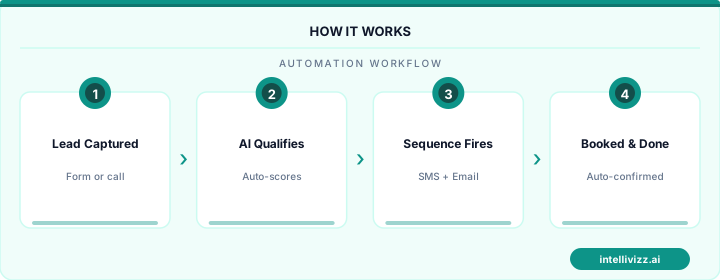
🔄 Data Collection Without the Monthly Chase
API integrations and automated submission workflows replace manual data assembly
Cross-Portfolio Benchmarking
One of the most powerful capabilities a portfolio dashboard enables — and one that is extremely difficult to implement without a standardized reporting system — is cross-portfolio benchmarking. When a portfolio company's EBITDA margin trails its sector peers by 8 points, the operating team needs to know whether this is a portfolio-wide pricing strategy decision or a specific company's cost structure problem. Benchmarking against external industry data is useful but imprecise; benchmarking against the firm's own portfolio of comparable companies in the same sector is significantly more actionable.
Implementing Meaningful Benchmarking
Effective cross-portfolio benchmarking requires three prerequisites:
- Definitional consistency: Metrics must be defined and calculated identically across all portfolio companies. EBITDA calculated on an apples-to-apples basis across the portfolio requires the standardized adjustment methodology described in the financial metrics section above.
- Sector segmentation: Comparing an HVAC services business's gross margin to a software company's gross margin is meaningless. The benchmarking infrastructure must segment portfolio companies by sector, revenue model (recurring vs. project), and business maturity for comparisons to be actionable.
- Statistical significance awareness: A portfolio of 12 companies in varied sectors cannot produce statistically significant benchmarks for every metric. The operating team should focus cross-portfolio benchmarking on the 3–5 sector cohorts where portfolio depth is sufficient to generate actionable comparisons.
For firms also leveraging AI for deal sourcing and target identification, the LP communication and investor relations automation that supports the portfolio reporting stack is detailed in our guide to LP investor relations automation, which covers the full investor communication workflow from quarterly reports through capital call notices.
Technology Stack: Tableau, Looker, and Custom Solutions
The visualization and reporting layer of the PE portfolio dashboard is the component with the most vendor options and the widest range of implementation cost. The technology selection should follow the data collection and standardization decisions — not precede them. A beautiful Tableau dashboard built on top of manually assembled Excel data is not a system; it is a visualization of a manual process.
Platform Comparison for PE Portfolio Dashboards
| Platform | Strengths | Best For | Indicative Annual Cost |
|---|---|---|---|
| Tableau | Visualization flexibility, Salesforce integration, broad connector library | Firms with dedicated analytics staff; complex multi-source dashboards | $1,500–$3,000/user/yr |
| Looker (Google Cloud) | Data modeling layer (LookML), embedded analytics capability, strong governance | Firms with engineering resources to manage LookML data models | $2,000–$5,000/user/yr |
| Power BI (Microsoft) | Microsoft ecosystem integration, lower cost, solid self-service analytics | Firms already on Microsoft stack (Azure, Teams, SharePoint) | $120–$240/user/yr |
| Visible.vc / Allvue / Juniper Square | PE/VC-specific features, LP portal integration, built-in portfolio company data collection | Firms wanting purpose-built PE software vs. general BI tools | Varies by AUM; $12K–$60K/yr |
| Custom (Metabase + dbt + Postgres) | Full control, lowest per-user cost at scale, customizable to exact workflow | Firms with in-house engineering or technical operating partners | $20K–$80K build + infra |
Data Quality and Governance
Data quality is the invisible constraint on portfolio dashboard value. A dashboard populated with inconsistently defined, manually entered data will eventually be ignored by operating partners who have learned that they cannot trust the numbers. Building data quality governance into the system from the outset — rather than attempting to retrofit it after trust has eroded — is one of the most important implementation decisions.
Key governance elements include: automated validation rules that flag submissions outside expected ranges before they enter the dashboard (a company reporting 0% gross margin or a negative headcount count signals a data entry error, not a performance issue), audit trails that record who submitted data and when, and a clear escalation path for disputed or corrected submissions. The governance layer is not glamorous, but it is what allows an operating partner to cite dashboard numbers in a board meeting with confidence.
LP Reporting Integration
The ultimate test of a portfolio KPI dashboard is whether it reduces the effort required to produce LP quarterly reports. The typical PE quarterly report process — assembling data from operating partners, portfolio company submissions, fund accounting, and IR narratives — takes 2–4 weeks and involves significant manual reconciliation. A well-implemented portfolio dashboard, with standardized metrics collected automatically and validated on receipt, can compress the quarterly report assembly timeline to 3–5 days, with most of the time spent on narrative drafting rather than data reconciliation.
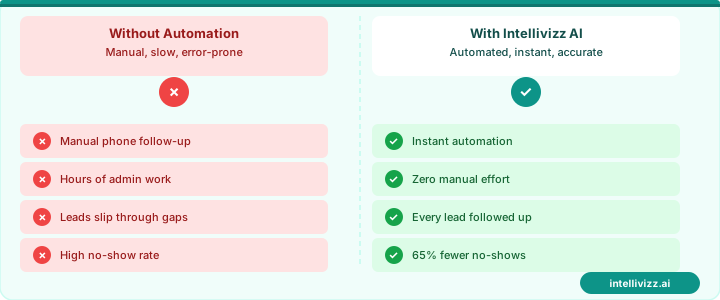
📋 Quarterly LP Reports From Dashboard Data — Not Manual Assembly
Standardized portfolio metrics flow directly into investor reporting packages
The LP reporting integration requires mapping dashboard metrics to the reporting format required by LP agreements — which may specify particular accounting standards, definitions, or audit requirements. For firms managing the broader range of AI-powered due diligence and operational intelligence tools in their investment workflow, our guide to AI in PE due diligence covers how the same data infrastructure that powers portfolio dashboards can accelerate the diligence process for new investments. A portfolio KPI dashboard is not just a reporting tool — it is the operational intelligence infrastructure that allows a PE firm to be a more effective owner across every company in its portfolio.
Dashboard UX Design Principles for Private Equity Operators
The distinction between a dashboard that gets used and one that collects digital dust comes down to UX decisions made long before any data pipeline is connected. Most PE portfolio dashboards fail not because of bad data but because of poor information architecture — too many metrics competing for attention, no visual hierarchy, and interaction models borrowed from enterprise software that operating partners and portfolio company CFOs find unintuitive.
Effective PE dashboard UX begins with a ruthless scoping exercise. Every metric proposed for inclusion must pass two tests: (1) Can a decision-maker take a specific action within 48 hours based on this number? (2) Would the absence of this number cause a meaningful gap in situational awareness? Metrics that fail both tests belong in a drill-down view, not on a primary dashboard surface.
Information Hierarchy and Visual Layout
The fold — the portion of the screen visible without scrolling — must contain the three to five metrics that matter most across all portfolio companies. For most buyout funds this means portfolio revenue vs. plan, portfolio EBITDA margin trend, aggregate cash position, and a summary count of companies flagged red or yellow in the RAG (Red-Amber-Green) status system. Every other metric lives below the fold or behind a click.
Card-based layouts outperform tabular displays for executive-level portfolio views because each card can combine a current value, a sparkline trend, and a RAG indicator in a single visual unit that takes two seconds to parse. The goal is for an operating partner to scan the entire portfolio status in under 30 seconds without reading any text.
Grid density matters enormously. Dashboards designed for 27-inch monitors at 4K resolution become unreadable when a managing director opens them on a 13-inch laptop during a board meeting. Design for the lowest-resolution scenario first, then enhance for larger displays. A maximum of four columns in the primary card grid, with cards sized at a minimum of 280×180 pixels, maintains legibility across device sizes.
Data Visualization Best Practices: Sparklines, Conditional Formatting, and RAG Indicators
Sparklines — small inline line charts embedded within table cells or metric cards — are among the most information-dense visualization tools available to dashboard designers. A sparkline showing 12 months of revenue trend within a 120×30 pixel space communicates trajectory, volatility, and momentum simultaneously. For PE portfolio dashboards, sparklines should show at minimum 13 months of data (current month plus trailing 12) to capture year-over-year comparisons without requiring users to navigate away from the primary view.
Sparkline design choices carry significant interpretive weight. A sparkline with a fixed y-axis anchored at zero tells a different story than one with a y-axis scaled to the range of values — the former emphasizes absolute magnitude, the latter emphasizes rate of change. For portfolio monitoring, use zero-anchored sparklines for absolute metrics (revenue, headcount) and range-scaled sparklines for ratio metrics (gross margin %, NPS score) to preserve interpretive accuracy.
Conditional formatting in tabular portfolio views should follow a consistent encoding scheme across the entire dashboard. The most effective scheme for PE contexts uses three colors — green, amber, and red — applied against performance thresholds set during budget planning. Green means within 5% of plan. Amber means 5-15% below plan. Red means more than 15% below plan or deteriorating trend even if above plan. These thresholds should be portfolio-company-specific, not uniform — a SaaS company at 13% below revenue plan is in a different situation than a manufacturing business in the same position.
RAG status indicators deserve particular attention because they become the primary navigation device for busy executives. When 12 portfolio companies are displayed simultaneously and three are red, those three command immediate attention. RAG indicators should be sized at minimum 16×16 pixels to remain distinguishable at a glance, should include a text label alongside the color for colorblind accessibility (the roughly 8% of men who have some form of color vision deficiency), and should link directly to a company-specific detail view that explains why the status is red and what actions are in progress.
Role-Based Dashboard Views: Executive, Operating Partner, and LP Perspectives
A single dashboard cannot serve three fundamentally different audiences. The managing director reviewing portfolio performance needs portfolio-level aggregates and exception indicators. The operating partner embedded at a specific company needs operational depth — daily sales metrics, hiring pipeline, customer churn by cohort — that would overwhelm a fund-level executive view. The limited partner receiving quarterly reporting needs a curated, narrative-enhanced view that contextualizes performance against fund thesis and market conditions.
Architecting role-based views requires a shared underlying data model with presentation layers tailored to each audience. The same revenue, EBITDA, and cash metrics flow through all three views, but the aggregation level, surrounding context, and visual treatment differ substantially.
The executive view at the fund level should display no more than eight to ten metrics per portfolio company simultaneously. These metrics should be agreed upon by the investment committee and remain stable across quarters to enable meaningful trend comparison. Frequent changes to primary executive metrics undermine the pattern recognition that experienced investors rely on for rapid portfolio assessment.
The operating partner view can support substantially more metric density because operating partners have deep contextual knowledge of their assigned companies. Operating partner dashboards benefit from cohort analysis tools — the ability to compare this month's new customer cohort against cohorts from 6, 12, and 18 months ago — and funnel visualization for sales pipeline health. These analytical views would be meaningless noise at the executive level.
LP-facing dashboard components require the most careful design because they are, in effect, investor relations material. LP views must balance transparency with appropriate data governance — LPs have contractual rights to certain portfolio information but not necessarily to granular operational data that could be competitively sensitive. LP dashboards typically show fund-level IRR and TVPI metrics, portfolio company revenue and EBITDA at the aggregate level, and narrative context that the IR team controls. Any LP-facing dashboard must go through legal review before deployment to ensure it aligns with fund agreement disclosure obligations.
Mobile Dashboard Requirements for On-the-Go Portfolio Monitoring
Operating partners and managing directors make portfolio decisions from airports, portfolio company boardrooms, and partner meetings. Mobile access to portfolio dashboards is not a nice-to-have — it is a requirement for any platform that aims to become the operational nerve center of a PE firm.
Mobile dashboard design for PE contexts differs from desktop design in three critical ways. First, interaction models shift from mouse precision to thumb-friendly tap targets — all interactive elements must be at least 44×44 pixels to meet iOS and Android accessibility guidelines and to prevent misclicks in mobile environments. Second, data density must decrease substantially — the four-column card grid that works on desktop becomes a single-column scrollable list on mobile, with each card expanded vertically to maintain readability. Third, the most critical actions — flagging a company for urgent review, drilling into a specific metric detail, sharing a snapshot with a colleague — must be reachable within two taps from the mobile home screen.
Push notification architecture is the mobile-specific feature that generates the most operational value. A mobile dashboard that only delivers information when a user navigates to it provides passive visibility. A dashboard that proactively pushes alerts when a portfolio company's revenue forecast deviates more than 10% from plan, when a company's cash runway drops below 90 days, or when a CEO updates a milestone status provides active portfolio oversight that fundamentally changes how operating partners engage with their companies.
Notification design requires the same rigor as the dashboard layout itself. Notification fatigue — the tendency to ignore all alerts when the volume becomes overwhelming — is a real risk in any portfolio monitoring system. Effective notification frameworks apply urgency tiering: critical alerts (covenant breach risk, material negative developments) delivered immediately via push and SMS; important alerts (plan deviation beyond threshold, upcoming board meeting with incomplete data) delivered once per day in a digest; informational updates (new data submission from portfolio company, benchmark report available) delivered weekly. Notification preferences should be configurable at the individual metric level so each operating partner can tune their alert sensitivity to their management style.
Offline mode capability, while technically complex, is increasingly expected by users who travel internationally and face connectivity gaps. At minimum, mobile dashboard applications should cache the most recent data snapshot and clearly indicate when the displayed data was last synchronized, allowing users to make informed decisions about whether cached information is current enough for the situation at hand.
Ready to leverage AI across your portfolio? Explore our private equity automation solutions.
Relevant AI Automations
Investor Relations Automation Suite
Transform LP communications from weeks of work to one click
AI Voice Agent — Investor & Deal Source Receptionist
AI voice agent answers inbound calls from LPs, deal sources, and founders 24/7 — captures intent, qualifies the caller, and books follow-up calls automatically
Portfolio Company Reporting Bot
Automate quarterly data collection from portfolio companies